


Electric Image Universe, the Sequel


Put Some Continuity in Your Life
It’s ironic that a company so-long known for its animation and rendering has really distinguished itself with its geometry studio. Modeler, the environment for building objects, is an inspirational blend of easy-to-use tools and power-user functionality. While it is uncanny how much Modeler resembles Alias’ Studio ($9,000 and up) in layout and workflow, Modeler’s interface, file management, and general usability are far better, particularly given that most of Universe’s target users in the media business can forgo Studio’s manufacturing precision, surface analysis, and CAD/CAM support.
Like Alias’ Studio and Maya, Electric Image’s Modeler is based on Spatial‘s ACIS Geometric Modeler software library, and offers a rich set of spline-based tools for creating just about any type of 3D object. The software relies heavily on NURBS, and offers control over continuity of surfaces. This allows you to merge an airplane’s wing to its fuselage without a visible seam, for example. However, unlike most NURBS modelers, Universe lets you draw with Bezier curves or polylines, and then to convert the lines to b-splines for operations such as skinning a curve net, which makes NURBS far easier to use. The modeler’s tools clearly require an investment in learning, but I was able to hammer out a convincingly detailed airplane after a week or so of tinkering, and I found Universe to be a very powerful modeling environment. When it came to blending multiple intersecting surfaces, however, I did find places where Modeler couldn’t cope, and I wished for some of Alias’s high-priced functionality for combining various types of continuity on a single surface, and projecting tangents, for example.
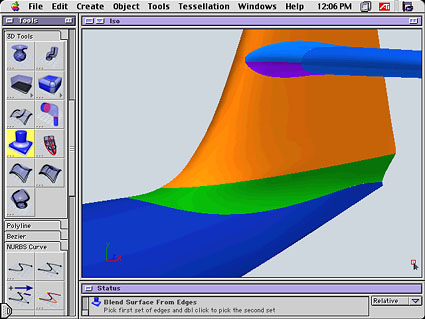
The Modeler provides a rich toolset for creating smoothly blended surfaces, such as the joint between this plane’s fuselage and tail, highlighted in green.
Unlike Animator, which shows lackluster OpenGL performance in areas like texture mapping, Modeler makes great use of real-time rendering. One feature that made my airplane-modeling project achievable was dreamy support for imported image planes. You can move and scale background image tiles like any object, and they are rendered on the fly as you work. This makes it easy to set up tracing templates that really cut the guesswork out of complex models when working with existing plans or sketches.
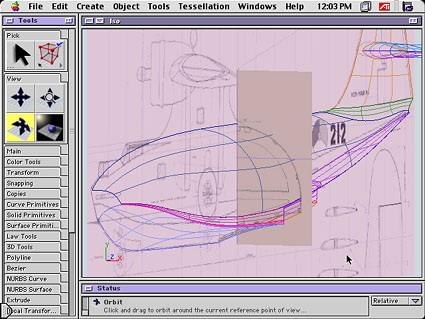
The Modeler’s support for image planes as modeling objects makes it easy to bring drawings and plans into the 3D workspace, and it greatly simplifies visualization while you work.
Another good modeling feature is Universe’s UberNurbs. This is based on so-called “subdivision surfaces,” a feature that lets you gradually dice and manipulate simple objects such as cubes to create complex organic objects very quickly. It is great for creating doughy organic forms, like fish bodies and faces, and it is similar to the NURBS modeling found in LightWave and the “advanced modeling” offered in the $15,000 “Unlimited” version of Maya.
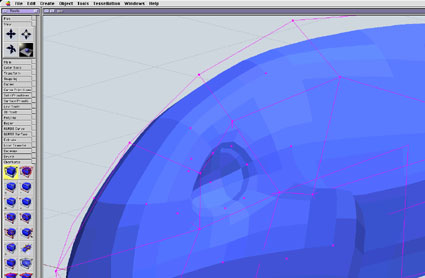
Universe’s UberNurbs feature allows you to quickly turn simple objects, such as a primitive cube, into complex forms.
Modeler’s feature set is impressive in its power, but it would be nice to see it emulate formZ in depth of options and precision control, especially when it comes to snapping and constraining, which are essential to creating accurate surfaces. Although you can draw an arc through three points, for example, you can’t draw an arc about a radius; and although you can rotate an object around any number of elements, you can’t scale an object about a snapping point.
Any quibbles about the Modeler, however, could be addressed with relatively minor upgrades. It’s clear this module has benefited from imitating the best features of other modelers on the market and from a measure of innovation to boot. I hope future versions offer a similar leap in animation features.
Thinking it Over
Electric Image Universe is an impressive re-introduction of a long-admired product, but it comes at a time when the rest of the 3D “universe” has been expanding at galactic speed. Though the Modeling module offers compelling competitive advantages versus other products, it is very new and it shows a corresponding lack of refinement. The Animator, meanwhile, is lagging in features, but its performance and rendering quality are tried and true. Whether or not Universe is worth the $1,999 sticker price depends on your animation priorities. If you need powerful modeling, and fast, high-quality rendering, but character animation is not an issue, then Universe is a very good buy.
This article was last modified on January 18, 2023
This article was first published on August 14, 2001
Commenting is easier and faster when you're logged in!

Recommended for you

How to Mess Up Your Hyperlinks Panel
Don't try this at home! (But if you do accidentally, here's how to fix it.)
The best way to create a Straddle Head
Keith shows an easy way to create a straddle head that works in all versions of...
Making Dynamic Text Wrap Permanent
A friend of mine who manages a printing company's prepress department told me th...