


Electric Image Universe, the Sequel


Desperate Character
Animator offers a new Inverse Kinematics engine for creating character motion, and IK chains are easier to apply than in older versions. They are also very fast to manipulate and calculate. Unfortunately, IK functionality is one place where Universe loses out to competitors. All the competing 3D systems have better support for character deformations (such as muscle flexing) and much better constraints for limiting the motion of IK objects relative to themselves and to the rest of the world.
In fact, serious character animators will continue to dismiss Electric Image in favor of other software. Although the Modeler relies on NURBS (non-uniform rational b-splines), which are ideal for modeling bodies and facial features, the Animator only handles imported polygonal meshes, and communication between the modules is nil, meaning you can’t animate the building blocks of objects to make them move in organic ways. In contrast, Alias Maya integrates its modeling and animation with powerful dependency hierarchies, so you can animate the NURBS meshes and construction curves that make up a model, making it feasible to animate a character’s facial expressions, for example, or to have the contours of a blobby monster conform to an undulating landscape as it slithers.
Electric Image has hinted at an upgrade to Universe that will address shortcomings of the IK system, adding the capability to paint on deformation weighting and offering better constraints and skinning features, but the company has yet to commit to a release date.
Electric Image has always lagged in its menu of out-of-the-box special effects compared to other software. Although this release offers only basic particle and explosion effects, excellent plug-in effects modules are readily available from third parties for a price (see “Plug-ins Key to Expanding Universe“). One effect that has been added to Universe, however — ray tracing — remedies a primary shortcoming. Universe’s new ray-trace renderer puts a substantial dent in the software’s class-leading rendering speed, but the effects are well worth the hit — providing crisp shadows, transparency with diffraction, and realistic reflections. Some of these are incompatible with z-buffered depth effects, such as fog and depth-of-field, which can force some hard creative choices, but fortunately ray tracing can be applied selectively, allowing the animator to specify whether objects should be ray traced or Phong rendered; types can be freely mixed to minimize the performance impact.
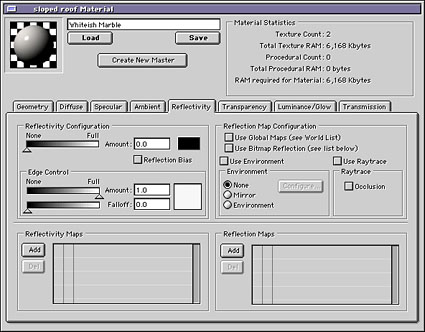
This texture-mapping dialog controls an individual object’s rendering parameters, including whether or not it should be included in ray-tracing calculations for accurate reflections and transparency. Selective ray tracing allows Electric Image to forgo expensive calculations for the sake of speed.
Renderer about Town
The Camera rendering module is a standalone application that performs the actual rendering of images when jobs are queued from the Animator. Although it is analagous to a print spooler and has virtually no “features” to speak of, its industry-leading rendering speed and great image quality have made it the darling of many film and video effects producers for years. Loyal users will certainly be pleased by the significant speed boost that Camera appears to offer in version 3.1, especially under OS X.
The fact that Camera is a separate application from the Animator allows the Animation module to quit during rendering, thus freeing up more memory for the job. And with Universe, more memory equates to more speed. On the Mac with OS 9.1 this strategy didn’t work reliably during testing, however; sometimes Camera was able to get a full allotment of RAM, but other times it failed to recognize that Animator had quit, and it launched with only the memory remaining after Animator’s allocation; sometimes Universe quit but failed to launch Camera. How much memory you’ll need in your system depends on the complexity of your scenes, but I would suggest having at least 500MB of RAM, and more if you plan to use other applications concurrently. It also possible that all will work better under OS X; OS X support had not yet been released as we conducted our testing.
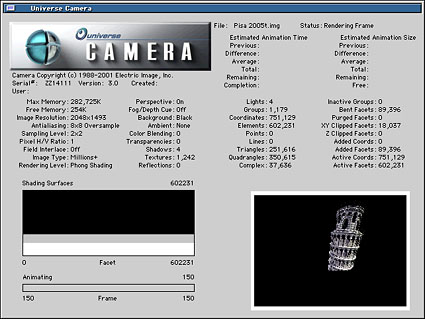
As the fastest renderer in the business, the Camera module is the heart of the Universe application.
Renderama is the slave application that is supposed to let you batch process your animations on remote machines. In practice I found it too slow to use. For some reason, saving a job file — usually requiring five or ten minutes of down time — ballooned to an hour or more when batching a scene across a fast network. I blame this partly on Electric Image’s poor documentation, which offers little in the way of tutorials or practical advice on optimizing its software or using it effectively. Here again, Electric Image should look to other software makers for examples of how to set up effective batch rendering.
This article was last modified on January 18, 2023
This article was first published on August 14, 2001
Commenting is easier and faster when you're logged in!

Recommended for you

Small Caps vs. OpenType All Small Caps
If you think the OpenType All Small Caps option is the best choice for styles th...

Museum Exhibit Showcases the Art of the Poster
If I had to name one form of artwork I really appreciate, it would probably be t...
KPG Simplifies Color Management With New Kodak Colorflow Custom Color Tools
Kodak Polychrome Graphics (KPG) announces the availability of Kodak Colorflow Cu...