



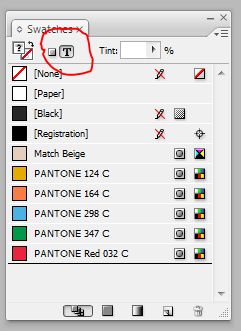
A recent post on the user to user forum was complaining about the difficulty of trying to apply swatches to text in InDesign. The poster went on to say that it seemed like a waste of time to deselect the text frame and then select text. Well, that’s correct. What the poster, and apparently a lot of other folks didn’t know, is that it’s simple matter to switch the focus of the swatch panel from the frame to the text itself.
With the frame selected, just hit the “J” key. The Swatches Panel focus will immediately switch to the text and you can apply the swatch you’d like to your text.
This article was last modified on December 19, 2021
This article was first published on September 8, 2008
Commenting is easier and faster when you're logged in!

Recommended for you

Eliminating the White Box Effect
One of the most common complaints of designers or print service providers when p...

Sizing Tables With a Script
Free script sets table properties that cannot be controlled by table styles, inc...
Changing Colors by Percentages
You have a process color, let’s say 80% cyan, 10% magenta, 20% yellow. Now...