




Every now and then a question will be asked in Adobe’s User to User forums about the capability of InDesign to perform a certain task and the answer is so obviously “no” that it’s not unheard of for that to be the one word response. And yes, I’ve been guilty of doing so myself.
On some occasions however, that obvious answer turns out to be not quite so obvious. Such was the case recently when a poster asked if text could be added to a frame already containing a graphic. The fact is that any attempt to do so will prove futile using any of the tools found in InDesign’s user interface. But my fellow Adobe User to User forum host and scripting expert, Dave Saunders, posted a script that will do just that by taking advantage of some features not accessible any other way.
By selecting a graphic frame and launching the script, dummy text will be inserted at the bottom of the frame.
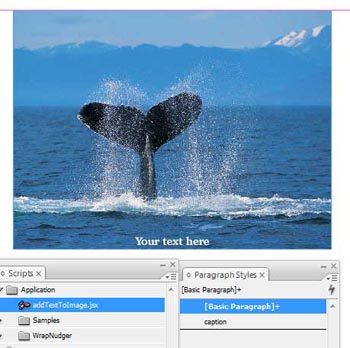
Just replace that with your text and assign any paragraph style you’d like to the text to finish it up.

If you’d like to try it out, you can download the script from here. Once downloaded, copy the script to InDesign’s Scripts Panel folder and it will be accessible in the scripts panel (Window > Automation > Scripts).
This article was last modified on December 19, 2021
This article was first published on May 18, 2008
Commenting is easier and faster when you're logged in!

Recommended for you

Sort Cross References
Cross-references are printed in the order in which they were added to the docume...
Index Fixes: Multiple Indexes in an InDesign Document
InDesign documents can contain only one index. But when you need more than one i...

Mapping Paragraph Styles to PDF Tags in InDesign
Map Paragraph Styles in your InDesign document to the proper tags for accessible...