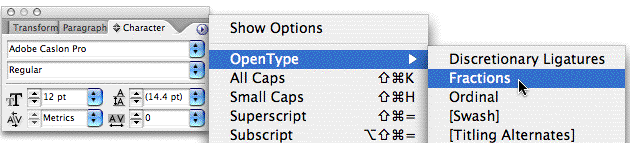
In our latest podcast, David and I talked about setting fractions in InDesign. Part of that discussion was how to correctly use an OpenType font’s “Automatic Fractions” feature, which is enabled by choosing Fractions from the OpenType fly-out menu in the the Character palette menu (or Control palette menu in Character mode):
Afterwards I remembered an OpenType Fractions cheat sheet I had been working on last year for my training clients but never finished. I updated it with new information and am posting here as a free download: OTFractionsGuide.pdf (400K, 5 pages).
Our InDesignSecrets Guide to Built-in Fractions in the Creative Suite OpenType Fonts shows what happens when you apply the OpenType: Fractions feature to fractions set in each of the 30+ OpenType fonts that are bundled with the Creative Suite. Use it to help yourself troubleshoot fractions oddities in OT fonts and to identify the ones that will work best for your publications.
As you’ll see in the PDF, not all OpenType fonts share the same fractions behavior; in fact, only a few of the bundled Pro-class fonts can take full advantage of what are known as Arbitrary Fractions – where any combination of numbers becomes a typographically-correct fraction when the Fractions feature is applied.
I included a few footnotes with deeper information, such as the Myriad Pro problem and how to fix it, and how and when to use the Numerator and Denominator styles in addition/instead of the Fractions style. Many thanks to Thomas Phinney, Adobe’s Program Manager for Fonts, for reviewing the PDF and helping me fill in the gaps.
This article was last modified on December 18, 2021
This article was first published on August 28, 2006
Commenting is easier and faster when you're logged in!

Recommended for you

Index Fixes: Multiple Indexes in an InDesign Document
InDesign documents can contain only one index. But when you need more than one i...

Resizing InDesign Layouts with AI
Most designers don’t create a single deliverable anymore. They create campaigns....