



I just got back from the New York City InDesign User Group meeting where I had the pleasure of joining Sandee Cohen and Dan Rodney in presenting some of the new features of InDesign CS4.
There’s usually some kind of little secret or trick revealed at these meeting but Dan came up with the coolest one of all. It was so cool that Sandee and I argued over who would get to post this. Guess who won? :)
No, it’s not a new feature, but sort of an Easter Egg and a way to get rid of the all caps in the panel labels:
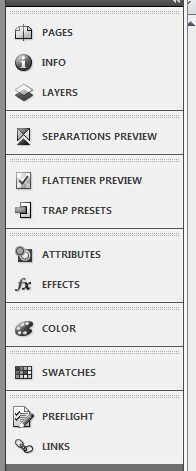
Good-Bye Upper Case
Here’s the trick that Dan demonstrated. Close InDesign and create a new folder in the InDesign application folder called noallcaps.

When you restart InDesign you’ll have a brand new look:

This won’t work in the other Creative Suite applications but at least you’ll get some relief from the caps in InDesign.
This article was last modified on December 19, 2021
This article was first published on October 22, 2008
Commenting is easier and faster when you're logged in!

Recommended for you

Meet the 2015 InDesign Team
InDesignSecrets members will have seen this month’s interview with product manag...
The Incredible Shrinking Italic Small Caps
When everything in a project proceeds according to plan, that’s great. It...

Why sRGB and Unsynchronized Color Settings Can Be a Good Thing
Anyone who knows me or the books I've co-authored, such as Real World Photoshop...