



Press Release
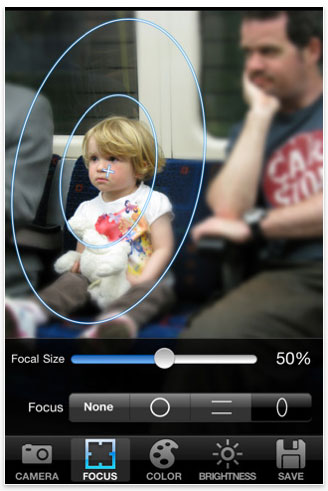
Digital Focus from TekTek is a camera application that allows you to create artistic pictures with blur and focus, just like taking a picture with a SLR camera. It’s available for the iPhone, iPod touch, and iPad.
Three main points
1. Blur the background and focus on the subject like taking a picture with a SLR camera.
2. Apply the Toy Camera-style effect to a picture.
3. Create a picture just like making the scene into a miniature world.
Four main features
1.Processing:
– Select from 4 focus shapes (circle, rectangle, oval, without focus)
– Adjust focus size (change the size of focused area)
– Adjust contrast within 3 colors (adjusting red, green and blue colors create toy camera-style effects)
– Adjust brightness
– Adjust vividness
– Control vignetting (add or remove light fall-off at the lens’s edges)
2. Settings:
– Select startup screen (launch camera, select from Album, etc.)
– Save original image (automatically save the original picture before editing)
– Miniature mode (fix focus horizontally, preset the color adjustment value)
– Save the previous color adjustment value
– Sound ON/OFF
– Select image size: iPhone3G (480×640, 960×1280, or original size); iPhone3GS/iPhone 4 (480×640, 960×1280, 1440×1920, or original size)
3. Load:
– Take pictures with iPhone camera
– Load an image from Photo Album
4. Save:
– Save to Album
– Send by email


Notes:
The blur effect is created by editing an image. The result is not the same as the effect of a real SLR camera.
To make a better miniature image, use a photo taken from a high angle to simulate the effect of looking down on a miniature.
This application doesn’t support multitasking.
Price: £0.59/$0.99/€0.79
This article was last modified on January 18, 2023
This article was first published on November 4, 2010
Commenting is easier and faster when you're logged in!

Recommended for you

Lightroom CC for Designers
If you’re a designer, you’d be forgiven if you responded to Adobe’s announcement...

Surreal Photoshop Effects: Swimming on Land
People swim in swimming pools. Or in the sea. But why limit ourselves to the obv...

CreativePro Tip of the Week: Decoding Illustrator’s Target Icons
This CreativePro Tip of the Week on deciding Adobe Illustrator’s Target Ic...