



Jon wrote:
I am seeking a method or tool for creating table header cells at a diagonal using InDesign. Do you have a method or know of a product (script, plugin, magic potion) that would allow me to do this?
Ah, for a magic potion! Unfortunately, I know of only one way to do this, and it involves brute force more than magic. The trick is anchored objects. You can anchor any object into a text cell, including graphics, lines, or even other text frames. So make a text frame with your heading, and rotate it. Here’s a rotated text frame sitting above the table:

(By the way, you can also put rotated text inside a non-rotated frame if you follow the instructions in this PDF tutorial. But it’s definitely not necessary for this trick. In fact, it may just make your life even more difficult. But I thought I’d mention it anyway, in case you hadn’t seen that PDF.)
Now, cut the rotated text frame with the Selection tool and paste it into the first cell with the Type tool:
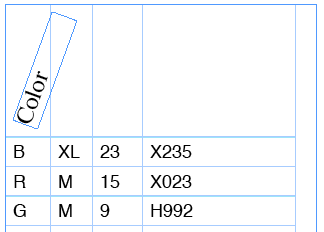
Note that anchored objects can stick out past the edge of table cells, so you can adjust the width of the column in order to “snug” it in a bit. Here’s the final table, after pasting in the header frames and formatting:

Obviously, I’m skipping a few steps, such as: It would be really useful to apply an object style to those headings first! That way you can later tweak them all at once, such as move them to the left or right. I sure wish you could apply transformations, such as rotation, in an object style! That would be an even greater help. Sigh.
This article was last modified on December 19, 2021
This article was first published on September 9, 2008
Commenting is easier and faster when you're logged in!

Recommended for you

Editing the Default New Document Preset
What if the majority of the layouts that you create in InDesign don't require fa...

How to Find Overset Text in InDesign Fast
InDesign tells you that you have some overset text, but sometimes it's hard to f...

Setting Vertical Text in InDesign
Renee wrote: As our crossword magazines are moving from QuarkXPress to InDesign,...