




Need some color inspiration? Have an Android phone or tablet? Then Makan Studios’ Real Colors app might be just the ticket. The app allows Android users (version 2.1 and up) to create and edit color palettes based on their photos.
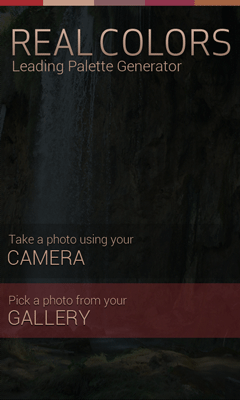
Real Colors comes in two versions, Lite (free) and Pro ($4.99, on sale through June 17 for $3.49). The Pro version allows you to generate color schemes using rules like monocromatic, triad, shades, analogous, complementary, split complementary or tetrad. And you can also use the Pro version to generate wallpapers for your mobile device from your generated color schemes.
Use of the app is simple to use. You start by tapping a photo you have on your device. Within 5 to 30 seconds the app generates a five color palette from the colors in the photo.

From there, you can edit the palette, giving it a name, and adjusting the colors themselves with HSB or RGB sliders.
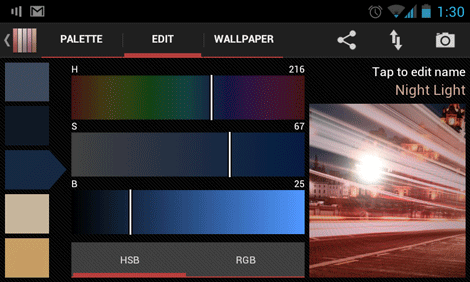
You can also see the colors’ Hex values. When you’re done, you can save the new palette to a library, and export it to Box.com, Evernote, email, or Facebook.
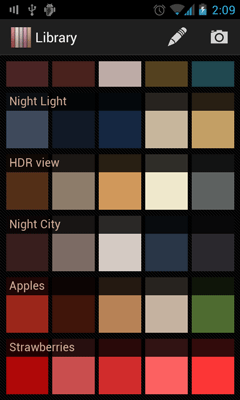
The current version of Real Colors does not have direct export to Photoshop or Illustrator, but the developers expect to offer that functionality in a future version. They are also actively seeking feedback and feature suggestions, so if the app intrigues you, but you wish it did something more, let them know.
This article was last modified on January 8, 2023
This article was first published on June 13, 2012
Commenting is easier and faster when you're logged in!

Recommended for you

Interview with Brittney Megann, CEO and Head Socialista
A self-taught CEO shares how she built a marketing business after a life-alterin...

Create an Automatic List Inside a Paragraph
Create automatic numbered or lettered lists inside an InDesign paragraph with th...
Better first proofs. Fewer review rounds. Introducing PreProof™
Most designers are already familiar with Preflight — checking a document for tec...