




Did you ever lose a font while you were copying and pasting text from one document to another?
Document A was created by a friend. Opened with no warnings or errors. Looks good, everything’s nicely styled. Or so it seems.

You copy some styled text to a fresh new Document B, and it comes in with the loathesome pink highlighting, indicating a missing font.
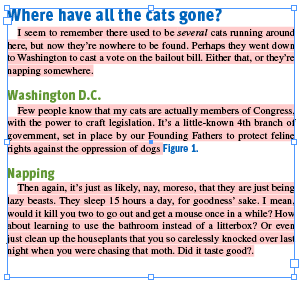
For Pete’s sake, how did you lose a font in the two seconds it took to copy and paste? Are fonts leaking out of the bottom of your machine? Stick a piece of paper under there and see if any letters drip onto it.
More likely, this is a case of InDesign’s stubborn insistence on demanding a particular version of the font Times. In this example, it is Times TrueType (TT). InDesign needs a font to apply when no other formatting is called for. The font it looks for is Times. If your machine has more than one version of Times available to InDesign, it can get a little confused and lock its default to one or the other. Document A was created with a copy of InDesign that locked down on TrueType. So that is the font you see in the Control Panel when [No Paragraph Style] is selected and all overrides are removed.

When you strip everything else away, you can see that this document has at its core, a deep longing for Times TrueType that will never* go away. [No Paragraph Style] can be overridden, but it can’t be redefined. You can try trashing your prefs, exporting to INX, loading styles from other docs, find/change, begging, screaming, or crying. It’s wedged in there real good.
Depending on how you construct your styles, you may never notice or be bothered by this issue, even if Times (TT) is your faulty default. But if you are in the habit of basing some styles on others, and especially if you change the definition of [Basic Paragraph] (as was the case with Document A), others who open your work may find themselves unable to copy and paste between documents without everything turning pink.
So how do you fix a document infected with a phantom phont like Times (TT)?
In the new document, the easiest thing is to just click on the style in the Paragraph Styles panel. This removes “override” of Times (TT) and the highlighting disappears. But you’re probably still left with a + in the style name. Option-clicking on the style will obliterate that +, along with any local styling of things like italic, bold, kerning, baseline shift, etc. That seems rather harsh. What if you wanted to keep that stuff? You need to change the style in Document A to sever it’s connection to Times (TT) once and for all. Try this.
1. In Document A, copy some text from a paragraph styled with the affected style. Make sure it’s not text that has any local formatting.
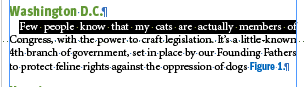
2. Deselect everything and paste so the text makes itself a new frame.

3. Select the pasted text and from the Paragraph Styles panel, choose Break Link to Style. Now that text is defined by your [No Paragraph Style] (hopefully not also Times TT), with all the specs from the old style as local formatting.
4. Just so InDesign knows you mean business, reapply the font from the Control Panel. It’s the exact same font, but go ahead and do it. I don’t know why this matters, but it does.
5. From the Paragraph Styles panel, choose New Paragraph Style. Give it a silly name. OK, it doesn’t have to be silly, but why not have fun?
6. Delete the old style and replace it with the new.

Last, fix the name of the new style.
Congratulations, doctor, the operation was a success. Times (TT) remains embedded in the old document, but it will no longer affect the style you re-created in this or any other document that text moves to. Copy and paste into a new document.
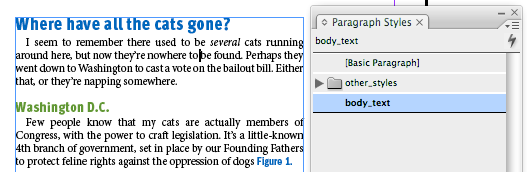
No pink highlighting. No +. Let’s call this method Break The Link, Ditch The Pink. Now where are my glasses…
*There is one way I know of to truly, finally, and completely obliterate Times (TT) from a document. But for that one, you’re going to need CS4. In the meantime, remember these letters: IDML.
This article was last modified on May 3, 2023
This article was first published on October 2, 2008
Commenting is easier and faster when you're logged in!

Recommended for you
How to Automate Chapter Headers in InDesign
See the most efficient way to automate numbered chapter headers using Text Varia...

SmileOnMyMac Releases PDFpen 2.4 with Support for Comments
SmileOnMyMac has updated PDFpen, the PDF editing and form-filling utility, and P...
Scanning Around with Gene: The Only Thing We Have to Fear…
One popular New Year’s resolution is to get organized, which is why retailers of...