




Daniel wrote:
Recently I had to export a document with lists (numbered questions with a, b, c… answers) to RTF, so it could be printed in Braile, but InDesign striped the numbers from the lists when I exported it (no numbers on the questions, no letters on the answers). Do you know any workaround to this strange behavior?
I’m going to have to agree with you that this does seem like strange behavior; after all, numbering or bullets are just paragraph formatting, such as indents and so on, and that should export in RTF just fine. However, you’re right that bullets and numbers get stripped away upon export. The good news is that you can convert those lists to real characters.
Here’s a list, with all the text selected (with Command/Ctrl-A):

Notice how the numbers aren’t highlighted — as though they aren’t even there. Now, let’s choose Convert Numbering to Text from the Type menu (or the Context menu):

This changes all the auto-numbers to real characters that can be selected:
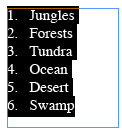
Note that you can also choose Convert Numbering to Text if you have one or more non-threaded frames selected with the Type tool (that’s often faster than selecting all the text).
Now, if we export this story, you’ll get real characters in the RTF. Of course, you should only convert the numbers or bullets after you’re finished editing the document and you’re sure you won’t need to use the auto-numbering feature anymore.
This article was last modified on December 18, 2021
This article was first published on March 8, 2008
Commenting is easier and faster when you're logged in!

Recommended for you
Create Parallax Transitions in PowerPoint
Create dramatic 3D scenes with Stephy Hogan using Morph.

Don’t Ask Your AI to Identify a Font
When it comes to identifying typefaces in images, artificial intelligence isn't...