




Hey folks, it’s time for another InDesign mystery that you can solve for a chance to win an awesome prize!
Here’s the scenario (and because it’s Halloween season, we picked one that’s totally terrifying): You have a long document with over 100 separate text frames, and all of them are slightly overset!
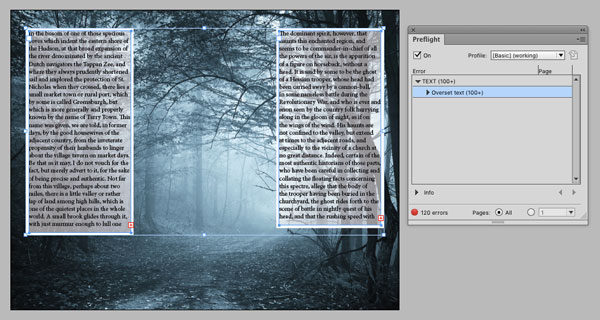
Your deadline is right now, so you have just one minute to fix all the overset text in the document. You are not allowed to edit the text in any way and you cannot change any text formatting. How can you solve this problem?!
This month’s prize is a copy of Sandee Cohen’s awesome book, Creating Animations in Adobe InDesign CC One Step at a Time.

There will be two winners:
- The first person to email me the correct answer
- A person chosen at random from all the correct answers I receive before October 28th, 2015
Enter now by emailing your solution to mike at indesignsecrets.com
Note: Comments are closed on this post while the contest is open so no one gives away the answer. Good luck!
This article was last modified on July 25, 2019
This article was first published on October 21, 2015
Commenting is easier and faster when you're logged in!

Recommended for you
Create Flawless Fractions with OpenType
Choose your font carefully if you need flawless fractions!
How to Make Motion Look Realistic in Premiere
Create a convincing animation in Premiere using the Transform effect.
Don’t Sweat the Math—Let Photoshop Do It!
Let Photoshop—and other Adobe apps—do the math for you when entering numerical v...