


Come to Order: FrameMaker 7 Gives Structure to Documents


FrameMaker seems to be Adobe’s best-kept secret. A tremendously powerful desktop-publishing program, FrameMaker has been ritually ignored by reviewers who instead concentrate on the big three DTP apps: QuarkXPress, InDesign, and PageMaker. Actually, up until version 7, FrameMaker came in two flavors: plain-vanilla and SGML. Adobe positioned the former as a niche “word-processing” product appropriate only for long-document production.
But the future of FrameMaker seems to lie in its structured-document capabilities stemming from the base product’s variant, FrameMaker+SGML. SGML (Standard Generalized Markup Language) is a system for organizing documents by specifying rules for tagging content elements, for example, body text, heads, and footnotes. HTML (HyperText Markup Language) and XML (eXtensible Markup Language), both languages used for creating Web pages, are subsets of SGML.
A tag is nothing more than a command placed inside a text document that specifies how an element should be formatted. The tags contain no formatting information — the user is free to create any format definition for any tag. When such a text file is read, or interpreted by software such as a Web browser, the material is presented according to the formats defined within the file. For example, when the browser sees an H1 tag, it looks up the formatting specifications for H1 (let’s say 20-point Arial) and then displays the element accordingly.
SGML also lets you specify rules, for example, that an H1 tag is always followed by body text or a List tag cannot contain an H1 tag. These rules are contained in file called a DTD (Document Type Definition) and assure that the final document will be uniform, regardless of who is editing or authoring the content. SGML is used to organize, or structure long documents whose sections may be written by different authors, are frequently revised, and are output in assorted formats (print and Web, for example). The advantage of an SGML structured document is that the structure and format specifications are built-in, so no matter how many people work on the project, the organization of material and appearance remain consistent. Needless to say, SGML is popular with companies that build complex machines that need extensive documentation written by hordes of engineers. As a result it operates on Unix as well as Windows and Mac operating systems.
Regardless of how FrameMaker is positioned, we prefer FrameMaker for all layout tasks that don’t involve typographically intensive four-color work. The program is nimble, stable, and includes a wide variety of production tools, such as cross referencing, conditional text, and advanced-table features, that the Big Three lack. Because FrameMaker is our bread-and-butter program, we hoped version 7 would include at least some of the suggestions detailed in the 300+-message wish list on Adobe’s FrameMaker Forum.
The Bad News
Well folks, unless you are a devotee of XML/SGML structured documents, prepare for a whopping letdown. Adobe added few features for creators of unstructured documents, and what they did include is an underwhelming assortment of trivial enhancements. For starters, master pages can be rearranged and automatically assigned to pages containing a specific paragraph tag, but the implementation of the latter feature is anything but straightforward. Instead of a neat and convenient dialog box where you might input the tags and equivalent master pages, you have to carefully read the documentation to learn how to set up a correspondence table on a reference page.
The number of running header/footers has been increased to 12. And there’s now import support for SVG (scalable vector graphics) and Illustrator 9 and later files. Sadly, native Photoshop files and transparency support are absent, which is a shame: Just because I’m laying out a long, text-heavy document doesn’t mean I don’t need good graphics support. But the Microsoft Word filter has been improved, supporting Office XP and eliminating some of the annoying bugs that plagued previous versions, like the random tabs that appeared inside imported tabular text.
Pointedly absent from this list are features that would genuinely enhance productivity such as: multiple undo; drag and drop; copy/paste table styles (as you can with character and paragraph styles); figure captioning; figure straddle across pages; reversed text; paragraph borders; and macro automation, to name a few.
The Good News
On the positive side, XML fans will be delighted with version 7, which offers a wide range of cutting-edge features for working with structured documents (see figure 1). By combining the hitherto separate FrameMaker and FrameMaker+SGML and adding collaborative features such as WebDAV (World Wide Web Distributed Authoring and Versioning), Adobe has created a behemoth authoring application that will appeal especially to industrial heavies such as Boeing and Martin Marietta, who produce tons of documentation in FrameMaker (and whose extensive site licenses seem to drive FrameMaker’s upgrade process).

Figure1: Most structured document features can be accessed from these menus.
However, even smaller businesses — technical publishers for example — can take advantage of FrameMaker 7’s feature set for streamlining the authoring process. The program includes three sample XML applications: DocBook 4.1, xDocBook 4.1.2, plus a solid tutorial called the XML Cookbook. FrameMaker 7 produces tagged PDF output as well, which is useful for multi-purpose publishing and can also export good old HTML Web pages. `
FrameMaker 7 lets you choose to work in either structured or unstructured mode (with the few enhancements described above, the latter is basically identical to FrameMaker 6). Working in structured mode means you have access to the elements of tagged document construction. You then create and edit the structured document by adding and organizing elements into a consistent hierarchy, for example, a book-title element followed by an author element, followed by headings, paragraphs, and figures (see figure 2).
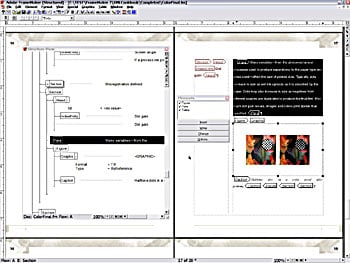
Figure 2: You can work in either the Structure view or the traditional document view. Changes made in either place automatically update in the other window.
FrameMaker imports and exports both SGML or XML structured documents and includes a standard set of structured templates for common publishing tasks. These templates include the element definitions required to produce consistent structured documents (see Figure 3).
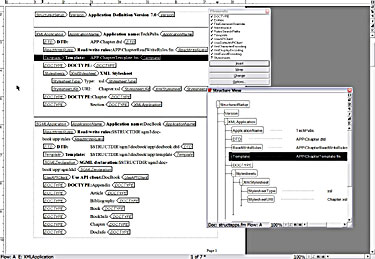
Figure 3: The Document Type Definition file is just another structured document. By customizing this file, you can create your own DTD.
We found working in FrameMaker’s structured document mode quite pleasant for both document construction and authoring — we prefer it to convoluted Quark’s XML authoring mode. By Selecting Structure Document from the File Menu, we easily set up a structure for an unstructured document, exported element catalogs, and edited application definitions without having to do more than occasionally consult the help files.
The bottom line here is simple: if you want to use XML and need a user-friendly program with powerful layout features, FrameMaker 7 is an excellent investment. However, current FrameMaker mavens who could care less about XML should keep the price of the upgrade in their pockets. Unless you absolutely have to stay current with the latest version, wait for version 8, which we hope will include the productivity enhancements most of us have been asking for.
This article was last modified on February 22, 2022
This article was first published on June 4, 2002
Commenting is easier and faster when you're logged in!

Recommended for you

Secrets of PowerPoint’s Selection Pane
Learn how to manage your slide content like a pro with the powerful features of...

Must-Have Scripts for Accessibility
Accelerate your accessibility workflow with these awesome automation tools.

Why a CMYK Vector Image Changed Color
Our friend Carlie wrote us with a problem that was so perplexing (and the soluti...