




Version 1 of Petr Stanicek’s free, Web-based palette generator Color Scheme Designer debuted way back in 2002. Now at version 3, it has matured into a tool that’s attractive with lots of features, yet fun to use.
You have your choice of monochromatic, complimentary, triad, tetrad, analogic, and accented analogic color palettes. You can tweak those palettes by dragging circles around a color wheel. You can also change the saturation, brightness, and contrast. To get a sense of how people with vision disorders see your color choices, simply choose from a drop-down list.
Once you decide on a palette, you can export it in formats that work in Adobe apps and HTML+CSS, XML, TXT, and GPL.
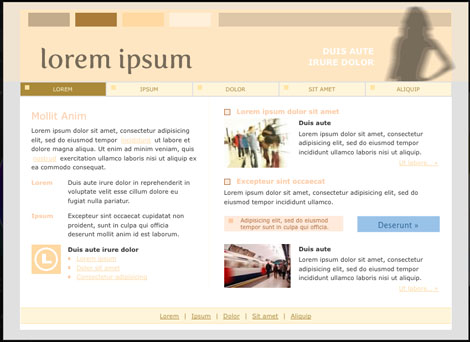
But my favorite feature is the ability to apply the colors you’re considering to a dummy Web page. You can choose whether darker or lighter colors in the palette predominate.
I generated this palette:
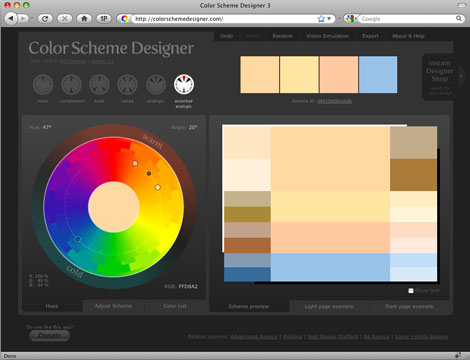
And applied it to a Web site template with dummy text and images:

This article was last modified on December 14, 2022
This article was first published on August 27, 2009
Commenting is easier and faster when you're logged in!

Recommended for you

Gathering Video Assets for Premiere Projects
Import, acquire, animate, and use AI to generate video content for Premiere
Livestream Video: CC Libraries: A Crash Course
Are you using CC Libraries? Tune in to find out why you should be!

Editor’s Picks for The Design + Accessibility Summit 2026
Our Editor in Chief lists his must-see sessions for The Design + Accessibility S...