




Some books have different-colored headings to indicate different sections. But if you have 5 sections, with 5 colors, do you need 5 different paragraph styles? There’s nothing wrong with that, but here’s another method you might consider.
What if you added a “1” at the beginning of each heading that needed to be in section 1, a “2” before the second section’s headings, and so on. For example:
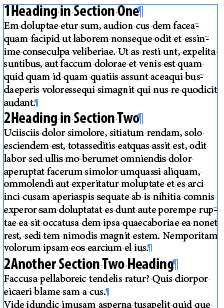
Then what if those numbers could trigger InDesign to color the style differently? and make the number go away automatically so that it looked like this:

Cool? So what fiendish feature allows this kind of transformation? Why, grep styles of course! (Is there anything that our superhero friend can’t do?) :)
In this case, I made three character styles: one that set the text red, one that sets it green, and one — my favorite — makes the text disappear (defined as .1 pt tall, 1% horizontal scale, and a color of None). Then I applied it all with these grep styles:

Nothing too fancy here. The first two styles look for the number 1 or 2 at the beginning of the paragraph (and apply the appropriate style to the entire paragraph; the last style looks for any number at the beginning of a paragraph.
Now, I know that there are plenty of complaints coming as to why this isn’t a good idea, including:
- Never apply a character style to a whole paragraph: To which I reply, “feh? there is always an exception.”
- You’ll see the numbers when you export to epub or html: To which I reply, “true, so you’ll need to find a way to strip them out for epub because epub can’t make that text disappear as easily”
- I don’t want to have to type numbers in front of all the headings: To which I reply, “yeah, that’s a hassle.”
Ultimately, there are no perfect solutions to this workflow problem, but I hope this alternative may be helpful to some of you.
This article was last modified on December 30, 2021
This article was first published on January 10, 2013
Commenting is easier and faster when you're logged in!

Recommended for you

Index Fixes: No Styling in Topic Names
Topic names cannot natively be styled in the Index panel. However, a simple solu...
Index Fixes: Sorting
InDesign doesn't distinguish letter-by-letter and word-by-word sorting, it suppo...

The Peter Kahrel Script Repository Gets a CreativePro Makeover
Peter Kahrel is one of the most prolific and influential InDesign scripters of a...