



It doesn’t take a genius to know that the when a new version of any software is released it’s just a matter of a short period of time until the bugs start getting reported. Most of the time these are minor annoyances and can be worked around. Additionally, those bugs are usually platform independent; Mac and Windows users get to suffer just the same with them. Not so, with this one, so Mac users can breathe a sigh of relief and stop reading right now.
If you’re on Windows and missing your tools (as in the screenshot below) or finding that InDesign is having other display issues, it’s quite likely that your computer is using a processor that doesn’t support SSE2. Among the effected processors is the AMD Athlon X. Adobe is aware of the issue and has released a knowledge base article but unfortunately right now there’s no fix for it.
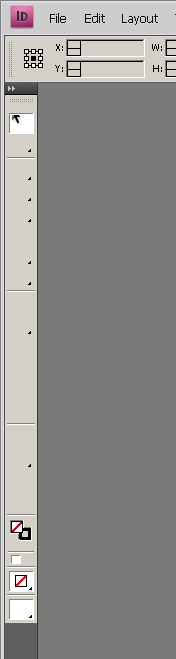
The link to that Knowledge base article is provided here so that if you are suffering with this issue, you’ll be able to check for updates there.
This article was last modified on December 19, 2021
This article was first published on December 13, 2008
Commenting is easier and faster when you're logged in!

Recommended for you

Hi from Steve Werner, and How to Handle Lots of Graphics
Hi, I’m the newest member of the InDesign Secrets team. Thanks to David an...
Icon Mining
To find perfect copies of InDesign's many logos, you need to dig deep into the a...
Use the CS3 Video Workshop to Learn InDesign CS3
On the day that Adobe started shipping InDesign CS3 (and the other CS3 applicati...