




Have you been pining for a digital SLR but been too chicken to sell your car or house to finance the purchase? Canon has been thinking about you. The eagerly anticipated Canon EOS D30 targets digital photographers who want the power and flexibility of an SLR with removable lenses, but who don’t have $5,000-$20,000 to drop on a camera.
Don’t expect to find the D30 at impulse-buy prices: Canon set the retail price at a solid $3,500 and estimates the street price at $2,999 (body only). Still, compared to the $5,000 price tag of the Nikon D1 — the D30’s closest competitor — Canon’s camera is positively a bargain, particularly when you consider the unit’s extraordinary image quality.
Rather than the usual CCD, the D30 uses a custom CMOS sensor, which produces 3.3-megapixel images with practically no noise. The sensor also consumes far less power than an equivalent CCD, and wrapped around this sensor is a camera body loaded with high-end features. Simply put, we were surprised to find that the D30 surpassed our expectations.
Almost Professional
Canon has gone to great lengths to explain that the D30 was not intended to be a “professional” camera (this may result partly from Canon’s agreement with Kodak that Canon won’t market a professional digital camera until 2002), and many users have commented that the D30 lacks the weatherproofing and rugged feel of the Nikon D1. Nevertheless, it’s hard not to be impressed when you pick up the D30. In addition to its heft (about 2 pounds), the camera feels very sturdy, with no hints of creaking or flexing. The D30 lacks a few high-end specs (more on this later), but it hardly feels like a consumer camera.
The D30, shown below, looks as if it was derived from the Canon Elan II. Though lacking the two-tone finish, the all-black camera provides the same grip and shutter-button/control-wheel design, and it sports the same mode dial and pop-up flash. And, of course, the camera is compatible with all EOS lenses.
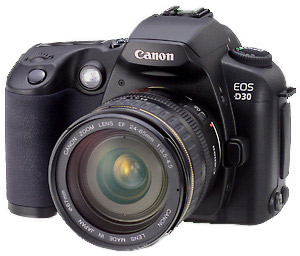
You power up the D30 using a two-position rotating switch located on the back of the unit. A rotating mode dial on top of the camera lets you select your shooting mode, and the D30 boasts the typical assortment of Canon mode choices, ranging from full manual through shutter and aperture priority to full auto. Five custom modes — sports, night, macro, landscape, and portrait — are also provided. Each locks the camera into appropriate settings — high shutter speed for sports, for example.
Full automatic handles everything, including whether to pop-up the camera’s built-in flash, while Program performs all exposure calculations but affords you a little more control, including whether or not to use the flash.
You control almost all other shooting functions using three buttons mounted on the top of the camera. These buttons, used in conjunction with the camera’s two control wheels, let you select a white balance, autofocus mode, drive mode, metering mode, or flash-compensation setting.

Exposure compensation is controlled by simply turning the control wheel mounted on the back of the camera. Just about the only shooting setting that requires you to delve into the menus is ISO speed, and this can be easily assigned to one of the camera’s external controls. You must also resort to the menus to change image quality, but this is not a big deal given that the great majority of buyers will pick a high-quality setting and leave it there.
You’ll find two final controls on the back of the camera. One selects the camera’s focus zone, and the other activates the camera’s exposure-lock feature, though it can be reassigned to perform other functions. The camera’s top-mounted LCD status display clearly presents feedback on all of the camera’s settings and functions.
A door on the right side of the camera provides access to the Type II CompactFlash slot, which is fully MicroDrive compatible; the camera comes with a 16MB CompactFlash card. The D30’s proprietary lithium-ion battery loads into a compartment in the bottom of the camera. Both mechanisms feel very sturdy.
All of the camera’s ports are included on the left side. USB and Video Out are located beneath a rubber door, while external power and flash sync each have their own ports with rubber covers.
In short, there’s remarkably little wrong with the design of the D30’s controls and interface. All necessary functions are easy to reach and simple to use, and the camera’s controls are fast and responsive.
This article was last modified on December 14, 2022
This article was first published on February 7, 2001
Commenting is easier and faster when you're logged in!

Recommended for you
Knowing Your Camera: The First Step for Getting Better Results in Photoshop
Understanding the abilities of your camera and Photoshop can help you produce be...

Scanning Around with Gene: Seeing Pictures With Both Eyes
When I die and go to my Heaven, it’s going to look like a store in Berkeley, Cal...

8 Tips for DSLR Video Beginners to Shoot Great Video
Video is more accessible today than it has ever been. DSLR cameras with intercha...