



This is a fictionalized version of my exploration of a recent client’s files: They’re finally making the switch from QuarkXPress, and I’m going to help them make the leap. They’ve used Markzware’s fine Q2ID plug-in to convert their old QuarkXPress files to InDesign. Unfortunately, all the resident evil (pronounced ‘eeev-yil’) of the original files has been faithfully maintained.
Does this sound familiar? I opened a file, and took a peek at the Paragraph Styles panel. Oh, boy, look at all these styles! This file must be well-constructed it would be a joy to work on. Then I clicked in some text, only to discover that it was formatted ‘Normal+?. I clicked in the headline-Normal+. The body text-yep, Normal+.

Oh, great. All the text is formatted as “Normal+” –think of the hours spent manually formatting!
So I went back to the Paragraph Styles panel, and chose Select All Unused from the panel menu and my worst fears were confirmed: not a single style had been used. Then I realized that they’d just imported a Word file into a supplied template, and manually formatted every single word. I was facing a looooong night.

It looks like a well-furnished Paragraph Styles panel — until you choose “Select All Unused.”
I opened another file, and was initially thrilled to see that the paragraph styles were used, but applying another style made no difference. This was the result of a bad habit many QuarkXPress users seemed to develop something I call ‘Two Coats of Paint.’ Almost every paragraph had a paragraph style, PLUS a character style applied. So changing the paragraph style couldn’t change the formatting, until you scraped off the character style. They had created a complete set of character styles, duplicating the specs of the paragraph styles.
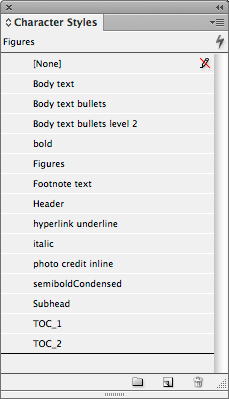
Most formatting was actually the result of Character styles — applied to entire paragraphs.
So, what’s the story? Why create styles if you aren’t going to use them? And why apply both paragraph and character styles to entire innocent paragraphs? It’s likely that there are two forces at work here… First, in-house marketing departments sometimes have templates created by an outside supplier, or by the one person in the department who’s most familiar with the application. Unfamiliar users start with an existing document, then edit the text and modify the formatting manually, because they fear (i.e., don’t understand) styles. Second, the ‘2 coats of paint’ comes from the confusing controls in the New Paragraph Style dialog in QuarkXPress; it leads a user to believe that you have to make a character style as part of creating a paragraph style, when in fact you can just edit the paragraph style’s features. Clearly, the creator of the original documents fell for this trap.
Of course, this isn’t QuarkXPress Secrets (if it were, there would just be one paragraph on the main page: ‘Switch to InDesign’), so I’m not going to spend time teaching you how to properly create styles in QuarkXPress.
But I think it’s worth pointing out how to properly use styles in InDesign.
First of all, USE THEM!
Then, understand that Paragraph styles are for (you won’t believe this)…paragraphs. Character styles are used only for little bits of text-for example, to emphasize a technical term. Don’t put two coats of paint on your text by using a character style on an entire paragraph.

Identifying Paragraph and Character Styles
Now, go out there and make me proud!
This article was last modified on December 30, 2021
This article was first published on December 28, 2012
Commenting is easier and faster when you're logged in!

Recommended for you

Threading Text From One Document to Another
A 20-year quest is fulfilled with InDesign CS4 and a little ingenuity!
Preflighting eBooks for Overrides
With the help of the Preflight panel, a plug-in, or a cool script, you can spot...
Saving Your Links Panel Settings
The Links panel in CS4 can be customized to show you exactly what you want, but...