



If you dig a little bit, you can find the Customer Stories, Customer Showcase and Site of the Day pages at Adobe.com. These are pages which are frequently updated with short articles focusing on neat things that customers are doing with Adobe software, and make for inspiring browsing.
 The latest customer story for InDesign is an interactive project created by the Seattle design studio Belle & Wissell. The publication, “Born Presents: 417 Projects, 903 Contributors” commemorates 14 years of Born Magazine, an experimental collaboration of art, literature, and multimedia.
The designers at Belle & Wissell used all of the new interactive features in InDesign CS5, in clever and imaginative ways, to create a SWF publication that will knock your socks off! And the best part is, you can download the “source code”, the live InDesign CS5 file and its links, to see how they did it!
To view the interactive publication, that is, to have the SWF file open in your browser so you can see it, you’ll need to go to Adobe’s page about the project and click the “View the digital publication” link you’ll find there. (The way Adobe configured the link, it won’t work elsewhere; and I can’t find any other links to the publication anywhere on Belle & Wissell’s or Born Magazine’s web site.)
To download the editable InDesign CS5 file, go back to that Customer Stories page and look for the “Source Files” link, or just click this one: BornPresents – Source Files (.ZIP, 117MB).
Most of the inside spreads resemble a typical print book, except for the navigation (the dots at the bottom center) and the occasional movie.

On a few of the spreads, though, you’ll find some very interesting and sophisticated interactive features. Below, I’ve zoomed in to an example of a series of buttons (the stack of text frames beginning with “Poetry”) that, on a rollover event, are set to jump to an object state (in the Multistate Object called “chart MSO”). Each object state highlights the relevant color in the wheel that matches the button’s label. (I say that now, but it took me about 20 minutes to figure out what was happening!)
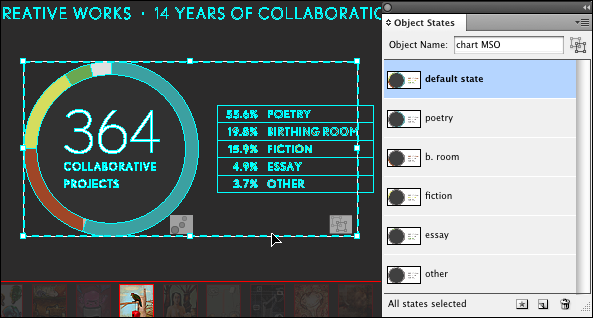
There are other suprises to be had in the project’s source files. The trick is figuring out how each effect was done. Hint: examine the Layers panel closely!
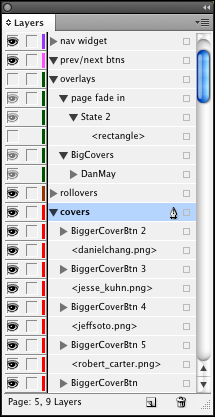
I think it was great that Belle & Wissell were so generous with the InDesign community. (Well, to a point, all the type has been converted to outlines, and all text and object styles deleted from the panels.) If you download that ZIP of the source files, you’ll find not only did they include the INDD file and its links (the placed movies), but also the final SWF file they exported, and its resources. Check it out!
This article was last modified on December 20, 2021
This article was first published on July 2, 2010
Commenting is easier and faster when you're logged in!

Recommended for you

Review: Suitcase 7
I’ve been a Suitcase Fusion user since version 3. As with the last couple of rel...

Living Peacefully Without the Navigator Panel
InDesign CS4 loses one old feature but adds a new way to get around a document.
Livestream Video: How to Create and Work with Mockups in Photoshop
Join Khara Plicanic for a deep dive into creating and working with mockups.