



Shooting a Stitched Panorama
Good stitching software can work minor miracles when joining images, but to get great results, you’ll need to put care into capturing the images to begin with. Referring to a short checklist can be very helpful in the field, especially if things are happening quickly. I based the bolded items below on my own checklist, though I’ve added additional information here that may be helpful.
- Got film? Or, in the case of digital cameras, do you have enough memory space? I use color negative film in my regular camera when I shoot panoramas. Negative film is superior to transparency film for this purpose as it has greater exposure latitude and can tolerate significant overexposure. When making a panoramic image, you will nearly always get some overexposure since at one point you’ll be facing the sun (also see exposure, below).
- Level mount. The rotational mount must be level. The best approach to leveling a camera for panoramic photography is to mount the bracket on a high quality ball-leveling mount. I use a Kaiser Phototechnik ball mount under my panoramic head, and it reduces my leveling time to about five seconds. This is a tremendous improvement over my early efforts at leveling the head by raising and lowering the tripod legs. Once the panoramic head is leveled, I always check to ensure that the camera is level on the mount. I carry a cut-off carpenter’s level to measure the front plane of the lens (where a filter would attach). From here I am guaranteed an easy stitching process.
- Clean the lens. This really matters, as dust tends to repeat 16 times in a panorama. Clean your lens in advance of shooting, so you don’t have to do it on a skyscraper roof in a 30-knot wind. My recommendation for lens cleaning is the Microstar lens-cleaning cloth. Available at most any camera store, they are the absolute best for cleaning optics. Clean the lens before setting the camera up for a series of shots.
- Set exposure. Manual exposure settings yield the best results. Before setting exposure, set up your tripod, and get your leveling out of the way. My method for determining correct exposure is to face the sun, then point straight out with my right arm. I then face the camera that way, and set the exposure in this direction, 90 degrees off the sun. Then I lock the camera on that exposure. With negative films this seems to work fine. When facing the sun, the image will be overexposed, and all the other steps will be acceptably exposed. The overexposure latitude of negative films will still allow for detail in the images shot into the sun.
- Set focus. The best images are made with focus locked at infinity or on the subject, if it is closer than infinity. Most panoramas are focused on infinity. Even most point-and-shoot cameras allow infinity lock. I recommend this, as you definitely don’t want the individual images to be focused on different distances, which makes high-quality stitching difficult at best. If you are making an indoor panorama, focus on the subject, and lock the focus if possible.
- Cover the viewfinder on an SLR camera. If you’re making a panoramic image with a single-lens-reflex camera, cover the viewfinder during the exposure series. It is surprising how much light can infiltrate the camera through the viewfinder. Some professional cameras have a shutter that can be closed to block the viewfinder. If your camera does not, place your hand over the viewfinder while making the exposures, or put your eye up to the viewfinder.
It seems like a lot to remember, but a successful panoramic image is much more complex than a single image, and if only one frame is bad in a rotation, it will ruin the entire image.
After shooting the panorama, process the film and scan it, or with a digital camera, copy the files to your computer for stitching. For scanning I am a big advocate of Kodak Photo CD discs. No process is simpler or more precise at the price. I have not tried the PC Photo discs now offered by Kodak, but they are probably good, too (though maybe a bit low in resolution).
Retouching and Adjusting
Panoramic images are like regular photos — only longer. You will probably need to examine the image carefully and do a little cloning to remove dust spots and other minor problems.
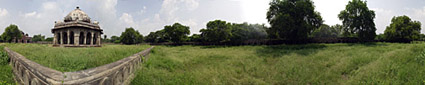
This image of Humayun’s Tomb in New Delhi, India, was taken with a 17mm lens on a Nikon D1 professional digital camera, which is the equivalent of a 24mm lens on a 35mm film camera.
When making panoramic group photos, someone always moves between the exposures; it’s inevitable. But, worry not! It’s easy to fix these problems. Open the contributing individual frame(s) and cut the necessary face with the lasso tool in Adobe Photoshop. Drop it on top of the panorama, and then carefully scale it and distort it to match the panoramic version. Then, using the eraser set to paintbrush mode, blend the overlay into the base and, when finished, flatten the image. It takes just a few minutes to accomplish a convincing patch.
New Horizons
In a future installment of this column, I’ll cover making object movies using the same technology but a different technique. In the meantime, you should find plenty to keep you busy if you decide to delve into panoramic photography by trying it yourself. If you like the idea but aren’t ready just yet to invest in hardware and software, you can always improvise using whatever camera equipment you have and with demo versions of stitching software. Unfortunately, Apple offers no demo download of its QuickTime VR Author Studio, but some companies — including MGI, PixAround.com, and VR Toolbox — do provide free demo-version downloads through their Web sites.
This article was last modified on December 13, 2022
This article was first published on May 22, 2001
Commenting is easier and faster when you're logged in!

Recommended for you

Illustrator Downloadable: Winter Birch Pattern Set
Lovely patterns and colors to use when you want to evoke the feeling of a cozy s...

How to Style Negative Numbers Automatically InDesign
Learn how to set up a GREP style in InDesign, so that negative numbers will auto...

Tip of the Week: Color Panel Tips
With this free InDesign script, you can fix problematic text wrap with precision...