




Here’s a quick design tip on working with photos and advertising design from issue 44 of Before&After Magazine.
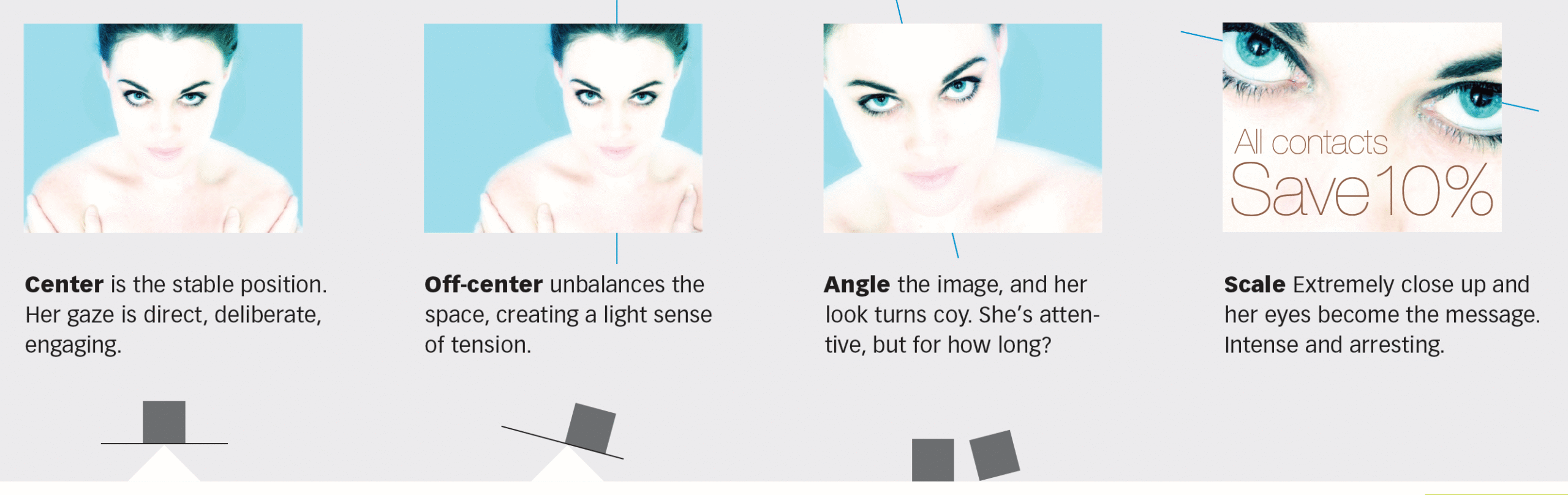
You can control the effect of your ad by changing the size of the photo, its angle, and the way it’s cropped. With so little material to work with, it’s important to make every nuance count.

A beautiful original will say different things depending on how you handle it.

Cropped in half, the photo gains intensity and mystery—and space for words. The ultralight typeface retains the high-key (light on light) theme.
CreativePro members can download original content from Before&After Magazine, a beloved resource that taught a generation of newly minted digital designers how to design and communicate effectively with the written word. See our archive here.
© John McWade/Before&After Magazine, courtesy of Gaye Anne McWade.
This article was last modified on January 4, 2026
This article was first published on December 13, 2024
Commenting is easier and faster when you're logged in!

Recommended for you

Before&After: Design a Letterhead, Envelope, and Business Card
How to turn letterhead, envelope, and business card into a single visual presenc...

Before&After: Draw Great Visual Instructions
Have something to demonstrate or explain? Don’t say it; show it!
Before&After: Optima: The Typeface of 9/11
How Optima brings dignity and humanity to the National September 11th Memorial.