Russell Brown

Russell Brown

About

RUSSELL BROWN is the Senior Creative Director at Adobe Systems, and an Emmy Award-winning instructor. He shares his delight in testing the creative limits of his tools, and his in-depth design knowledge and zany presentation style has won him a regular following among beginning, intermediate, and advanced users alike.

Article
Get Rid of Red Eye in Photoshop

Learn how to use the Red Eye tool in Photoshop

Learn more
Article
Sharpen Focus with Photoshop’s Auto-Blend Layers

This tutorial is courtesy of the Russell Brown Show. There are times when low light or other factors make it impossible to capture a photo with a deep depth of field, yet a shallow depth of field may not yield the result you’re going for. In those situations, take several shots of the same subject […]

Learn more
Article
Get Your Portfolio on the iPad

This tutorial is courtesy of the Russell Brown Show. I’ve recorded five video tutorials that demonstrate how to move portfolio content from your computer to an iPad or other portable device. Here are some of the topics I cover in the various videos: * How to sequence images so they appear in the desired order […]

Learn more
Article
Photoshop How-To: When You Can't Cut It Out, Cover It Up

This tutorial is courtesy of the Russell Brown Show. When masking gets tough, sometimes just covering up the problem is the only solution. Photographer Scott Copeland presented me with a wedding photo that was perfect — except for the beer bottle and speaker interrupting the mood. The healing brush worked on the beer bottle, but […]

Learn more
Article
Create Amazing Digital Paintings with This Free Photoshop Filter

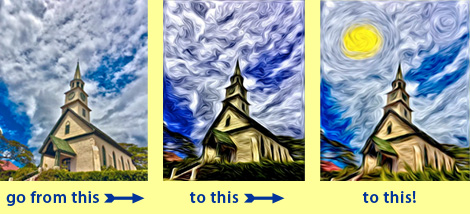
This tutorial is courtesy of the Russell Brown Show. Pixel Bender, a set of plug-ins that’s compatible with Photoshop CS5, includes many filters that take your images in new directions. But in this tutorial, you’ll learn how to go even further, transforming the oil paint filter beyond its stock results and creating a unique piece […]

Learn more
Article
Mask Flyaway Hair in Moments Using Photoshop

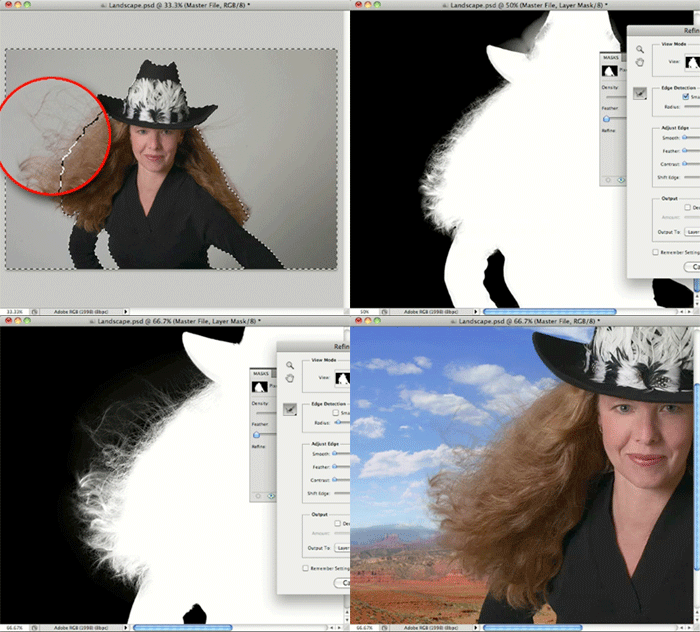
This tutorial is courtesy of the Russell Brown Show. The hardest part about masking has always been selecting areas of transition, such as flyaway hair on a portrait. The new masking tools in Photoshop CS5 are so easy to use that even novices can get impressive results: Just select a subject using the Quick Selection […]

Learn more
Article
Create Content-Aware Patterns to Fill Out Photos

This tutorial is courtesy of the Russell Brown Show. Photoshop CS5’s Content-Aware Fill feature intelligently fills in an area with texture that matches the surrounding pixels. While Content-Aware Fill is an amazing retouching tool that just about any Photoshop user can benefit from, its defaults are more successful on some photos than others. (Don’t have […]

Learn more
Article
Replace Missing Parts of a Photo in Photoshop

This tutorial is courtesy of the Russell Brown Show. Content-Aware Fill is a jaw-dropping feature, new to Photoshop CS5, that intelligently matches the lighting, tone, and noise levels of surrounding areas as you retouch a photo. But here’s one use you might not have thought of for Content-Aware Fill: filling in the empty corners that […]

Learn more
Article
Advanced HDR Editing Techniques

This content is courtesy of The Russell Brown Show. In this tutorial, I begin with the Merge to HDR command in Adobe Photoshop CS4 Extended. I use it to combine seven photos shot one stop apart. The resulting high dynamic range (HDR) image looks OK, but I think it could be better: And in fact, […]

Learn more
Article
Easily Enhance Photos

This tutorial is courtesy of the Russell Brown Show. Camera Raw gives you fast and easy access to the data hidden in photos. Best of all, it comes with Photoshop! In this tutorial, I show you how to bring out the colors and the qualities of an image shot by photographer Clark Little. The original […]

Learn more
CPW Icons

June 29–July 3, 2026

Nashville, TN (and online)