


The Lowdown on RIAs


If the Internet were a smoky bar, these days most of the talk in the back room (where the real business happens) would be about Rich Internet Applications, often called RIAs. In the next few years, RIAs will transform the way we think about the Web, adding more depth and features to online content, and RIAs may even eliminate many traditional desktop apps.
But what exactly is a Rich Internet Application? How is it different than a normal Web site, and what does it take to build one? In this article, I’ll look at what RIAs can do, some of the key technologies involved, and what you should know before diving into the process of creating an RIA.
How Rich is Rich?
There’s no single definition of a Rich Internet Application.
One way to describe RIAs is that they have the kinds of customized interfaces more commonly associated with traditional desktop apps than with normal Web sites, making Rich Internet Applications feel… well, richer. For example, when you move your mouse over a button in an RIA, the control might pulsate gently — and when ‘you click the button, new information might appear with an elegant fade-in effect instead of just popping up, as it would in a traditional site.
Another distinguishing feature is that most RIAs let you do something besides viewing online content. Rich Internet Application frameworks (which I’ll talk about more in a second) include tools for sending information to and from a Web browser without moving between pages, providing the basis for complex interactive applications. If a Web site lets you send your Amazon wish-list to your spouse’s cell phone, tweak the snapshots from your latest fishing trip, or use a Web browser to play poker with your buddies on another continent, it’s probably an RIA.
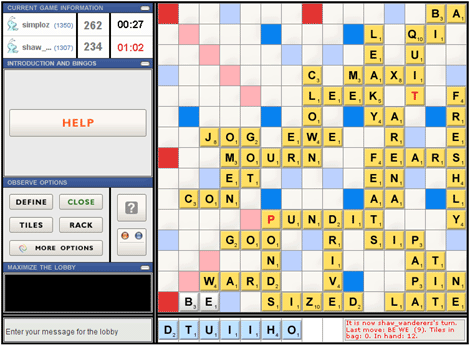
Figure 1. The Scrabulous online game is a simple example of an RIA.
Looking Under the Hood
Most RIAs consist of two major components: a Web-based client interface through which users interact with the application, and a central “application server” where information is stored. In practical terms, there’s not much difference between a server used for an RIA and one used for a traditional large Web site. Instead, it’s the client interface that makes Rich Internet Applications more sophisticated, interactive, and powerful than normal Web sites.
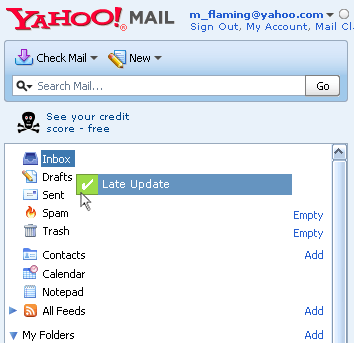
There are dozens of frameworks you can use to create the client interface of an RIA, but the majority of Rich Internet Applications are built with one of a few widely accepted tools. RIAs were originally developed using a combination of dynamic HTML (DHTML) Web pages and JavaScript. This combination, sometimes referred to as AJAX, is still popular today. Although this method isn’t well suited for RIAs that are geared towards working with graphics or multimedia, it is the basis of programs like Google Maps and the latest version of Yahoo! Mail, which uses AJAX to provide Web-based functionality comparable to desktop email programs, such as Microsoft Outlook.
Some key advantages of AJAX-based RIAs are that they can integrate easily with traditional Web sites and don’t require special browser plug-ins. Script.aculo.us, Dojo, and other free AJAX packages provide pre-built functions, such as drag-and-drop, interactive Web forms, and special effects, that make building Rich Internet Applications based on AJAX relatively easy.
Figure 2. Yahoo! Mail, an RIA, includes desktop-like drag-and-drop functionality.
Along with AJAX, many early RIAs were built with Macromedia Flash, a technology initially designed for creating animated movie clips. After Adobe acquired Flash, it announced plans to extend the platform into a full-fledged toolkit for creating RIAs. The result was Adobe Flex, one of the more exciting recent developments in the RIA world. In many ways Flex is the next generation of Flash, but it includes a complete programming language you can use to create literally any kind of application.
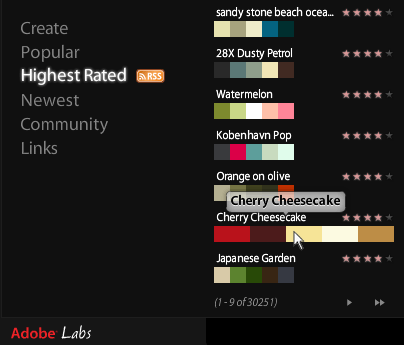
Flex also comes with powerful tools for creating multimedia animations, transitions, layouts, and user controls. One example of a Flex-built RIA is kuler, a slick online tool for designing color themes with integrated links to Adobe CS3 products. Caveats to keep in mind when considering Flex are that most search engines have trouble finding content inside Flex applications, and that you must have the Adobe Flash plug-in installed in your Web browser to view RIAs built with Flex.
Figure 3. Adobe Kuler, built with Flex, is full of effects that mimic desktop apps, such as the transparent tool tip you see here.
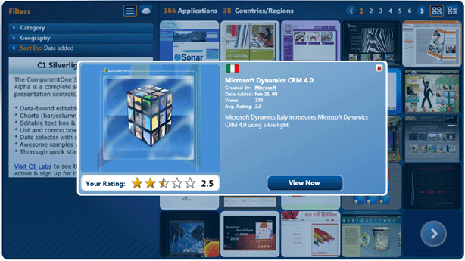
A third contender in the world of RIA technologies is the Microsoft Silverlight framework. Silverlight offers similar functionality to Flex but allows RIAs to interact with desktop-based Microsoft products, such as Office. Like Flex, Silverlight requires you to install a special browser plug-in. Silverlight isn’t as widespread as Flex or AJAX, but it may be a good choice for RIAs that will use files created with Microsoft programs.
Figure 4. The Microsoft Silverlight demonstration site showcases such features as desktop-style pop-ups.
Turning Concept into Reality
Technical mumbo-jumbo aside, let’s say that you’ve got an amazing idea for a Rich Internet Application. It might be an elegant new way of showing off your portfolio online, a perfect method of delivering a branding message, or the next killer Web app. What are the practical steps involved in making that vision happen?
Designing an RIA is different than designing a standard Web site in several ways. Most importantly, unlike normal Web sites, RIAs are about offering a complete user experience, including sound, movement, and seamless transitions. This means that when designing for an RIA, it’s crucial to think about these kinds of questions:
- How will the application react to user actions in a way that makes it feel alive and responsive?
- How can the interface encourage users to explore?
- How will different parts of the system connect together in ways that make sense?
Unless the designer of an RIA spends time seriously considering questions like these, the end result is likely to look like a traditional Web site. As a result, although you can use programs like Adobe Photoshop or Illustrator to create mockups and graphical assets for RIAs, it may also be helpful to build wireframe outlines of your application with tools like PowerPoint, Omnigraffle, or Visio, as a way of providing interactive illustrations of how the application will respond to user input.
Once you have an initial design, the next step is to start implementing your RIA. Unless you have experience working with programming or scripting languages (like JavaScript or Visual Basic), you’ll probably want to partner with a Web developer to build your RIA. By reviewing the application mockups and discussing the kinds of features that will be part of the RIA, a Web developer can help you identify the best technologies for your project and provide realistic estimates for time and labor costs. As a general rule of thumb, RIAs are faster to build than similar desktop applications, but more time consuming than traditional Web sites.
From Here to Web 2.0
If you’re used to thinking in terms of traditional Web sites or print design, the technical complexity of RIAs can seem intimidating. But rich technologies are quickly becoming the de-facto standard for creating complex, elegant Web content. Even if you don’t have plans to build the next Flickr or Facebook, spending some time using RIAs and studying RIA toolkits can be an educational glimpse of new ways to realize interactive design concepts online, and of how the next generation of the Web is taking shape.
This article was last modified on January 8, 2023
This article was first published on March 14, 2008
Commenting is easier and faster when you're logged in!

Recommended for you
How to Create A Silhouette in Photoshop
Learn how to create a silhouette in Photoshop by starting with the ideal image,...
Controlling Line Breaks With Data Merge
One of the limitations of Data Merge is its ability to control line breaks withi...

InDesign Mag Issue 34: Color, Utko, Postcards, ACE, and more!
Here’s the thing: InDesign Magazine comes out once every two months. It...