



When I last compared QuarkXPress and InDesign, XPress 6 had shipped, but InDesign CS had not. I had been beta-testing InDesign CS at the time, but my non-disclosure agreement with Adobe didn’t allow me to talk about the new version’s features or my experiences with the product. Now the gloves can come off and I can publicly evaluate the two most recent releases, side by side. The results surprise me.
I’m surprised because I’ve been a QuarkXPress lover since 1988, when I switched from PageMaker to what I considered a real page-layout program. I was a QuarkXPress evangelist in one “shootout” after another around the United States during the early 1990s. After hundreds of hours learning how to eke every little tip and trick out of the program, people started calling me “Mr. QuarkXPress.” So I’m surprised. I’m surprised because when I compare QuarkXPress 6 and InDesign CS, the result is obvious: InDesign is the real page-layout program, and QuarkXPress 6 feels like a relic.
The Whole Experience
In my opinion, there is an important difference between adding features and improving a product. Quark has been busy adding features to QuarkXPress, but while users can now do substantially more than they used to, they can’t do their work substantially better or easier. Sure, XPress has a variety of HTML tools, and you can create multiple layouts in a single document, but its typographic and layout features have hardly changed in more than a decade.
This is in stark contrast to Adobe InDesign. Each version of InDesign has not only added important features, but also improved on the previous version’s features. InDesign 1.5 already had far more typographic prowess than XPress, but Adobe improved it anyway in version 2, and now InDesign CS offers even more control over type. For instance, the new Lock First Line of Paragraph to Baseline Grid essentially lets you have more than one baseline grid per page (see Figure 1).

Figure 1: InDesign trumps the much-vaunted typographic controls in QuarkXPress with features such as Lock First Line of Paragraph to Baseline Grid.
Whereas QuarkXPress has become slower and more cumbersome in each subsequent release, InDesign is actually getting faster in many ways, as Adobe focuses a large part of its engineering resources on improving the program’s performance.
Quark has also shown a shocking disregard for user interface. For example, many people avoid the Space/Align feature in XPress because its dialog box (which hasn’t changed since the early ’90s) is just too confusing. And the Merge features in XPress (what Illustrator and InDesign calls “pathfinder” features) have an interface that only a programmer could love. Alternately, InDesign’s comparable features — the Align and Pathfinder palettes — are icon-driven, intuitive, and much easier to use (see Figure 2).


Figure 2: Hardly anyone uses the QuarkXPress’s Space/Align (top) or Merge (bottom) features because of their poor interfaces. Corresponding features in InDesign (middle) are generally clear and require little brain activity to achieve powerful results.
Even if you don’t care about typography or the elegance of a program’s user interface, InDesign still offers far more than XPress. For instance, after all these years, QuarkXPress 6 now gives us multiple undos. But there are still many features that are not undoable, like moving a guide, drawing a starburst, or making a change to a master page. Actually, it’s worse: Most undoable actions in XPress also stop you from undoing any previous actions. So much for multiple undo. Conversely, not only is everything undoable in InDesign, but even if you crash (let’s face it, all software crashes sooner or later), InDesign protects your document — even unsaved documents — and you lose hardly any work.
Quark has done its best to spread fear, uncertainty, and doubt regarding InDesign’s ability to print. The reputation is unfair. Sure, InDesign 1.x had printing issues, but no more than QuarkXPress 1.x did. InDesign 2’s print engine was completely reworked, and has been improved further in InDesign CS to the point that some printers and imaging centers now prefer it over XPress. The only InDesign printing problems I encounter these days are due to confirmed bugs in some PostScript RIPs.
Focus on the Features
Last year, Quark executives told me that it was foolish to compare the features of InDesign and QuarkXPress because features don’t matter — rather, what matters is how productive users are. I agree that when it comes to comparing these major page-layout products, it is crucial to look at the big picture — from training to technical support, from third-party developers to acceptance by printers and employees. However, ultimately, I disagree with Quark’s approach: To me, productivity and efficiency always come down to what a program can do.
On the one hand, InDesign wins because it offers big-ticket, flashy features like drop shadows and full support for transparency in native Photoshop and TIFF files. These features mean that I can actually lay out a page in my page-layout application, rather than switch to Photoshop 50 times a day. They mean I can focus on design rather than drawing clipping paths.
On the other hand, InDesign also wins because Adobe has implemented the basics better than Quark — those features that everyone uses repeatedly each day, like guides, the lock feature, linking text frames, and importing text and graphics. InDesign’s Control palette is head-and-shoulders better than XPress’s Measurements palette, letting you control all aspects of object positioning and text formatting (even paragraph and character styles).
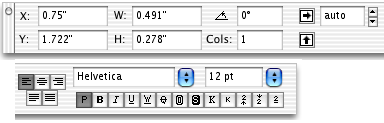

Figure 3: The Measurements palette in QuarkXPress (top) pales in comparison to InDesign’s Control palette (bottom). [Note: both palettes have been cut into two pieces to better fit the Web page.] InDesign helps reduce palette clutter by including commonly-used features for character and paragraph formatting (when you select text) or object control (when you select a line or frame). Tip: Switch between the character and paragraph panels of the palette by pressing Command-Option-7 or Ctrl-Alt-7..
Quark has even bungled one of the most important and elementary features of any page-layout program: seeing what imported graphics will really look like when printed. Quark won’t even let you use this feature until after you have registered your program and downloaded two XTensions. InDesign just has this feature built-in; plus, it’s significantly faster and easier to use than Quark’s. After trying the full-resolution feature in both these programs, it feels like Quark’s is a bad hack compared to InDesign’s smooth elegance.
In fact, “bad hack” describes my general feeling about almost every feature in XPress 6, from exporting PDF files (it has to print PostScript to disk and then freezes while the PostScript is turned into PDF, taking twice as long as InDesign to create the same PDF file), to printing in OS X (you can’t choose a printer from the Print dialog box), to the anemic Table tool (which can’t flow a table across columns or pages) to the clever-but-poorly-implemented Synchronized Text palette (which can’t handle anchored objects). The one new feature in XPress 6 that I’m really pleased with is ability to paste-in-place (pasting an object in the same place on different pages) — a feature which InDesign had in version 1.0.
Tipping the Scales
At the recent Adobe InDesign Users Conference in Florida, I was asked if there was one thing that tipped the scales for me, one thing that made me want to use InDesign instead of XPress. Ther e are two things. First, Quark seems incapable of changing its program for the better. For example, users have complained for a dozen years that when you lock an object in XPress you can still change its contents, move it by changing values in the Measurements palette, or even delete it. That doesn’t seem locked to me, but Quark can’t seem to fix it. In the same vein: you still can’t rotate tables (even by 90 degrees) or include fonts in exported EPS files — basic features that any user has a right to expect.
The second “tipping point” for me was working with InDesign CS; the new features answer so many of my long-held wishes. InDesign CS has a Story Editor to make editing text easier; a Separation Preview palette which lets me actually see color separations on screen before printing; nested styles for automatically applying character styles to a drop cap or the first word or the first sentence of a paragraph; “header” rows that automatically appear at the top of each column when a table spans multiple pages; the ability to export PDF/X or even save a page as a JPEG image without buying third-party tools. I apologize if I sound like I’m gushing, but after so many years of using XPress, it’s a relief to find software that actually offers what I need.
Where XPress Wins
Of course, just because InDesign is the better product doesn’t mean everyone should use it. There are certain situations where QuarkXPress comes out the winner. QuarkXPress has a number of features — big and small — that InDesign does not, and for some people these discrepancies make all the difference. For example, XPress supports hexachrome color, while InDesign does not. Many of the new features in XPress 5 and 6 revolve around HTML (rollovers, cascading menus, and so on), while InDesign CS has no export as HTML feature (version 2 did, but Adobe removed it, in favor of a new Package for GoLive feature).
QuarkXPress has drag-and-drop text editing, a kern-pair editor (see Figure 4), and the ability to save hyphenation and justification settings as named styles. It lets you build diagonal or oval gradients and apply coarse halftone and image tone adjustments to TIFF and JPEG images. XPress respects text wrap settings for objects on a master page while InDesign does not. XPress can add pages automatically as you type or edit a story; InDesign cannot. I wish InDesign did all these things, but personally my work doesn’t rely on any of them, so I don’t miss them much.
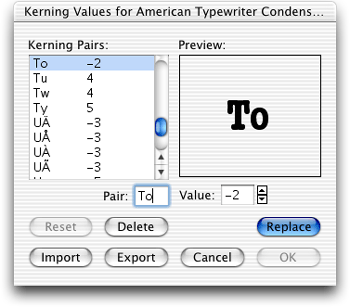
Figure 4: I’d like to see a feature such as QuarkXPress’s Kern Pair Editor find its way into the next version of InDesign.
Some companies rely on certain QuarkXTensions or proprietary workflows that don’t have parallels in InDesign, such as those that use QPS, or do autopagination of textbooks, or variable data printing. These folks are stuck using XPress for the time being. Of course, there are workflow solutions that do involve InDesign, and more InDesign plug-ins are being developed each week, and as more people use InDesign, more developers will be encouraged to write plug-ins for it.
Features Ain’t Everything
Ultimately, both products have plenty of room to improve. For example, neither product includes automatic running heads for directories or catalogs, numbered lists and bullets, object styles (like style sheets for boxes and lines), or the ability to specify type formatting such as indents in em units (which would change as the type size changes). InDesign needs to be able to control text wrap around objects anchored in text or on master pages. QuarkXPress needs to work on its scripting support, especially on the Windows side.
Performance on slower machines used to be an important difference between the two programs; however, while earlier versions of XPress worked reasonably well on slow, RAM-deprived computers, both XPress 6 and InDesign CS require fast machines with plenty of RAM. Both programs also now require Mac OS X or Windows 2000 or XP. I would like to see performance improvements in both programs.
QuarkXPress costs several hundred dollars more than InDesign, and outside the United States the difference is even higher. In fact, if you want to publish in anything other than English, you have to pay a premium for Quark’s Passport program (which is almost twice the cost of XPress). Plus, you can’t share multi-lingual files with single-language XPress users. On the other hand, InDesign ships with 12 Roman languages built-in and because it’s Unicode compliant (XPress is not), you can exchange InDesign files whether they include Hungarian, Japanese, Russian, or Arabic.
After so many years extolling the benefits of QuarkXPress, some folks seem to think that I’ve been brainwashed or paid to like InDesign so much. Nope! I just sat down and systematically compared the programs — their features, their cost, and how productive each empowers users to be. InDesign is like a tall, cool glass of water on a hot day — after the grime and sweat I’ve become accustomed to, InDesign is surprisingly refreshing and offers exactly what I need.
Read more by David Blatner.
This article was last modified on March 10, 2025
This article was first published on December 17, 2003
Commenting is easier and faster when you're logged in!

Recommended for you

Introverts and The Art of Self Promotion
Many creative professionals tend to be introverted. Often they feel this is hold...

Tips to Optimize Color for Your Designs
Key tips to follow to use color effectively in your designs

This Month in InDesign Articles, August 2019
Have you ever wondered why Adobe called it “InDesign”? Why not OutDesign or Over...