


Get Down and Dirty in Photoshop


This excerpt is from Photoshop CS4 Down & Dirty Tricks. Used by permission of New Riders. Copyright © 2009. Part of the Creative Edge Photoshop Resource Center.
Exclusive access for CreativePro.com readers provided by:

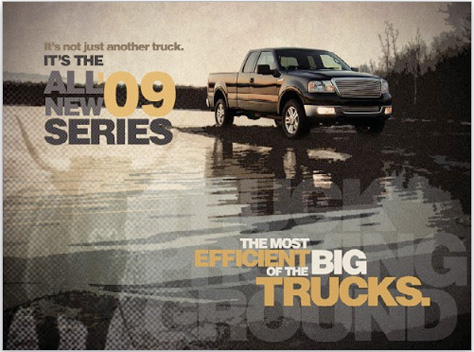
In this how-to, you’ll start with a regular photo and end up with a powerful advertisement. Along the way, you’ll learn Photoshop type and image techniques that you can apply to many projects.
First, download the resource files. Then follow along step-by-step to create a halftone pattern type look made popular by a slick series of TV and Web ads for Ford’s F-150 truck.
While the type effect itself is pretty simple, what makes the project a lot of fun (and a great learning experience) is going through all the steps you need to create the whole look of the ad from scratch.
You’ll start with this:

And end up with this:
CreativePro.com readers have special access to this entire article on the Creative Edge website. Click here to read “Get Down and Dirty in Photoshop.”
This article was last modified on January 6, 2023
This article was first published on August 12, 2010
Commenting is easier and faster when you're logged in!

Recommended for you

How to Adjust Colors Using Photoshop’s Contextual Task Bar
Learn how to use the Photoshop Adjust Colors feature to make quick, non-destruct...

Using Photoshop’s Generative Fill to Remove Objects
Learn how to simply remove items from an image in Photoshop, without extra conte...

How to Adjust Colors in Photoshop Using Hue and Saturation
Learn how to manipulate an image’s colors using Photoshop’s Hue and Saturation s...