


A Script to List Hyperlinks From Your InDesign Document
Use a script to generate a list of hyperlinks from an InDesign file.


A couple of weeks ago, I needed a list of all the hyperlinks used in an InDesign document. (As it happens, it was for our mammoth All Star Tips feature in the final issue of InDesign Magazine, #150.)
The information I needed—the dozens of links in that feature—was buried just out of easy reach. The Hyperlinks panel offered many automatically named “Hyperlink” and a sequential number. And the text in the panel was selectable, but un-copy-able.
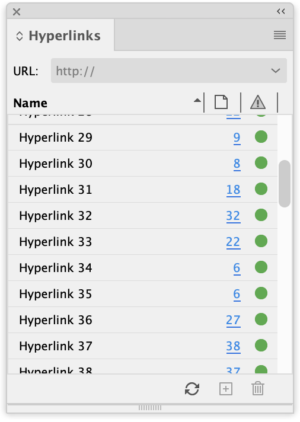
In short, the destination URLs were not visible without physically editing the links one by one.
“There’s got to be an easier way,” I kept muttering to myself.
I kept looking for that elusive obscure feature (“of the week, eek, eek”) that would give a simple report—something very much like Copy Info for Selected Links in the Links panel menu. If it’s there, I sure couldn’t find it.
So what’s the first thing a creative pro should think when there’s something that your software should be able to do but doesn’t? You guessed it: “Maybe there’s a script for that.”
A little web sleuthing brought me to a deep link to a page on the Adobe Support Community’s InDesign section, where a member had posted some not-quite-working code for a “script to extract hyperlinks from InDesign file with page number.”
Manan Joshi came to the rescue! The InDesign Automation and Plugin development consultant, a prolific contributor to the Adobe discussions, had responded to the original poster with modifications to create a tiny script that did exactly what the original user needed—and what I also needed at that moment.
“I feel good that the information helped you out and that in itself is a very satisfactory feeling,” Manan replied when I wrote him to make sure I was attributing the authorship of the script properly.
A crowbar for your hyperlinks
The script is simple, but you will need to give it a name—I used “hyperlinks”—and save it as a text file with the extension .jsx. Follow these instructions to install it.
Open your document, run the script, and it will display a dialog box with all the links.

Click “OK,” and that data will be saved into a text document, which you can then use with abandon.

I was able to do a quick search and replace in BBEdit to add a tab before the URL so I could paste the whole list into Excel in column form. Maybe you would need a list like this to very easily construct SQL queries or build full HTML source code around these links.
The point is, if you ever need this information, you will have a very specific reason—and this simple solution will give you the digital crowbar you need to get your links out of InDesign.
A big shout out to Manan Joshi and the pros who hang around these discussions. They give so much of themselves and their time to the InDesign user community.
Commenting is easier and faster when you're logged in!

Recommended for you

Getting Started with AI in Illustrator
Basic steps to create and modify vector content using the Generative AI features...

ALAP Releases InBooklet 3.0.4 Update for Adobe InDesign
A Lowly Apprentice Production, Inc. (ALAP), a leading developer of extended tech...
The Convoluted Path to Symmetry
Version: 4 Operating systems: Macintosh, Windows Creating symmetrical objects is...