




Applying a table style to an existing table in InDesign is often a lesson in futility. While cell styles seem to work as designed, table styles usually don’t. When you apply a table style to an existing table, the appearance of the table often doesn’t change as you’d expect. InDesign tries to preserve the existing formatting of the table as “overrides,” so most of the formatting defined in the incoming table style doesn’t get applied. Most users end up manually applying cell styles to the body, header, and footer rows to achieve the desired formatting. Keep in mind that table styles are intended to “cascade.” In other words, a table style can specify that one or more cell styles get automatically applied to the table body, header, footer, left column, and right column whenever you apply the table style to a table.  Cell styles can specify that a paragraph style is applied every time the cell style is applied to a cell.
 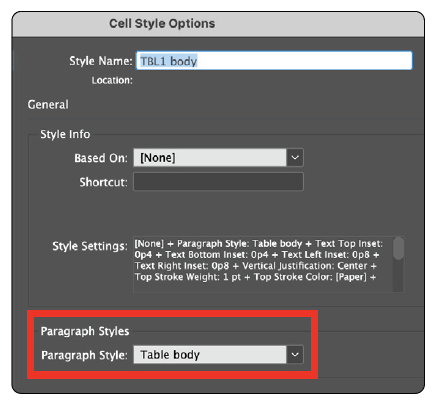 To overcome the problems described above, I wrote a script. It allows you to apply a table style to an InDesign table, and all the table formatting defined in the table style—including cell styles and any paragraph styles defined in those cell styles—will be accurately applied to the table, clearing out all style overrides. So, you can format an entire table with a single click, all the way down to formatting the text within the table’s cells with paragraph styles, potentially saving a lot of confusion, frustration, and wasted time. You can download the Apply Table Style Clear Overrides script
at GilbertConsulting.com. The download package contains a Read Me with installation and usage instructions.
Commenting is easier and faster when you're logged in!

Recommended for you

Tip of the Week: Decimal Align Numbers in Table Cells
This tip was sent to Tip of the Week email subscribers on October 9, 2014. Sign...

Massaging Text with InDesign (Getting the Text You Want from the Text You Have)
When faced with a complicated text processing task, why look any farther than In...
Adjusting Gradients in Table Cells
When you want a gradient to fit inside a single table cell, you need to take ext...