



InDesign CS5 is full of headline worthy features like multiple page sizes, interactive documents and span/split columns. Despite these major features, I find myself happiest with the little changes that make working easier. Here are some of the little changes related to color.
Swatches in the Control Panel
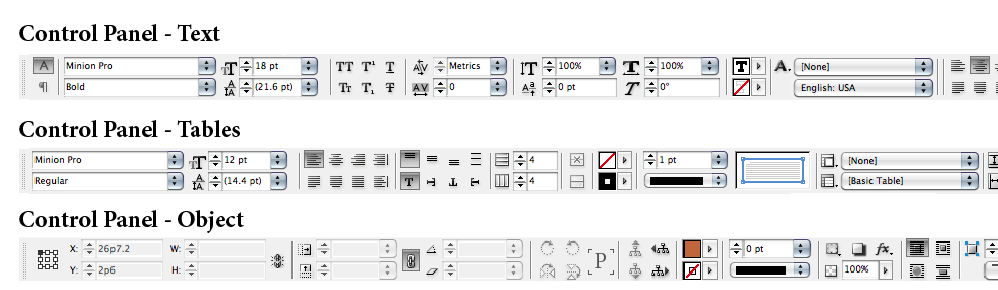
The biggest change related to color in CS5 is the addition of swatches to the control panel. If you have used the last few versions of Illustrator, you might already familiar with its implementation. Depending on which tools you have selected, the swatches will appear in different located locations in the control panel.
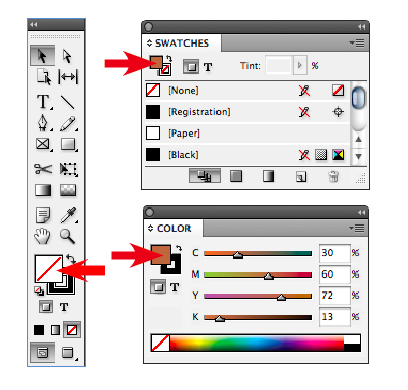
When you click on the fill/stroke you will get access to the swatches panel. Since it is so easy to access your swatches here, I have removed my swatches panel from my regular workspace. If you shift click on the stroke/fill you will get access to the color panel. Another useful feature is that you do not have to worry if your stroke or fill is forward when choosing a color. When you access the stroke color, the stroke is forward and when you access the fill, the fill is put forward. Now I have one less thing to worry about when I am working.

My favorite part of having swatches in the control panel is when you are working with tables. In previous versions of InDesign it was pretty crazy to change the strokes of table cells since you had to manage the stroke panel, swatches panel and switch between the stroke and the fill. Now I can select my cells and quickly make all of my edits using various settings in the control panel.
CMYK is the Default in the Color Picker
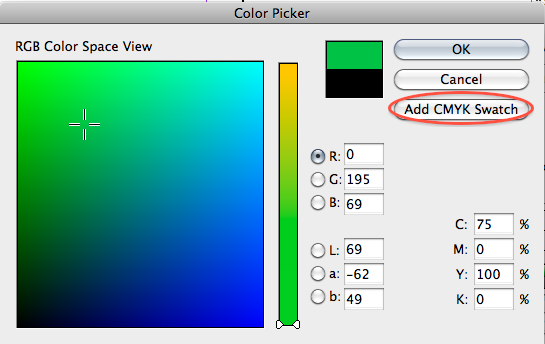
The color picker is itself an obscure feature of InDesign that many users may not know about. To get to the color picker you need to double-click on any stroke or fill proxy inside InDesign. You can find these proxy’s in the toolbar, color and swatches panel.
The color picker is a large color field and color spectrum where you can visually choose a color for your layout. A potential issue with using the color picker is that if you have a frame selected and choose a color and click ok, you will have created an unnamed color. To avoid this situation you should always add your new color as a swatch from the color picker dialog. In pervious versions this would default to a RGB swatch which meant you had to either click in one of the C,M,Y or K values first or convert the color after adding it. In CS5 the new default is CYMK which will save a lot of time and headaches.
Whole Number CMYK Values in the Color Panel

While I rarely use the color panel, I do find it annoying that when you pick a color the values would be decimals like 23.85%. This is finally fixed in CS5 and now you will only get whole numbers when you choose a color from the color panel.
This article was last modified on December 17, 2022
This article was first published on June 18, 2010
Commenting is easier and faster when you're logged in!

Recommended for you

Creating Custom Default Swatches
When you open InDesign you are greeted with a few default swatches, styles, and...
How to Find InDesign Documents That Use Specific Fonts and/or Swatches
Ever have to determine which of your InDesign files uses a particular font or co...

How to Convert from Print to Web Intent in InDesign CS5
The New Document dialog box lets you choose Intent, but how to change it after t...