



Jacob wrote to us with a problem he was having with a file: he was having trouble with some hyperlinks and so had deleted all the hyperlinks in his document… but the hyperlinks kept working in his exported PDF files! Why, he asks, won’t those hyperlinks stop working?
In this case, the problem is probably not corruption or anything terrible. In fact, it doesn’t really have anything to do with InDesign at all! Rather, it’s probably just a new(ish) feature in Acrobat. When “Create Links from URLs” is turned on in the General pane of Acrobat’s Preferences dialog box, it’s constantly looking for text that looks like it might be a Web address. Even email addresses are fair game, so if it sees an email address, it automatically treats it as though it had a mailto: link on it.
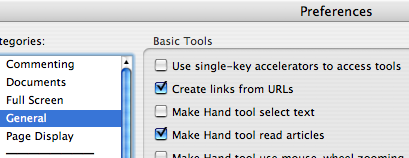
If it bugs you, go ahead and turn that preference off in Acrobat or break up the URL on your InDesign page so that it fools Acrobat.
This article was last modified on December 18, 2021
This article was first published on September 5, 2007
Commenting is easier and faster when you're logged in!

Recommended for you

Create a Flat-bottomed Stroke
Our guru of strokes reveals another trick: How to create a stroke that has round...
Mirror, Mirror On The Page: Cute Reflection Trick
Want to create a fun reflective appearance in InDesign – without having to...
Fun Text Style Effects from The InDesign Conference
I’m about to head over to FIT for the opening day of The InDesign Conferen...