


Batch Export InDesign Documents as PDF, JPEG, or EPS with the Free Page Exporter Utility
Oops, you’re not logged in!
Log in or sign up for a free account.


A number of people swear by the free Page Exporter Utility for exporting InDesign documents as individual PDF, JPEG, EPS, or Postscript pages (or outputting multiple PDF files as a batch process). The bad news is that it hasn’t always been easy to find a copy of it on the Web. The good news is that the script’s author, Scott Zanelli, long ago consented for us to post the newest version (at the time) here. The even better news is that it is still working hard in the latest version of InDesign.
You can download Page Exporter Utility by clicking the download button in the header area of this post.
The Page Exporter Utility offers a number of options for exporting your files. For example, you can export each spread as an individual PDF file, specifying custom naming and so on: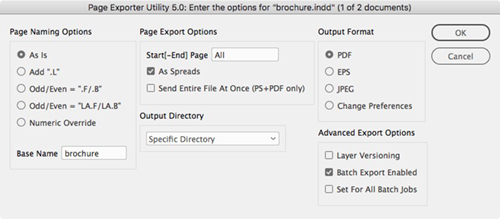
There is also a “versioning” option that lets you create a number of different PDFs from different layer combinations. For example, lets say you have one Base layer and three language layers. You would want three different PDF files: English+Base, French+Base, and so on.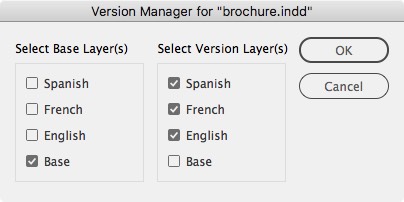
PEU is clever, it’s super fast, and it has a darn good price (free). If you’re a scripter, you can customize the script (Scott has released it under the GNU General Public License) and it even comes with a user manual.
This article was last modified on May 26, 2026
This article was first published on January 4, 2018
Commenting is easier and faster when you're logged in!

Recommended for you

How to Make Multiple Social Media Posts in One Photoshop File with Artboards
Here’s how you can use artboards to make social media graphics perfectly s...

Rules for Working With Tiny Type
Ilene Strizver offers guidelines for maximizing the readability of small type.

Photography Camera Shutter Speed Explained
Mastering shutter speed is essential if you plan to shoot moving objects, events...