




What the heck?! I opened an InDesign document and got this Missing Fonts dialog box that tells me “Myriad Pro Nothing” is missing!
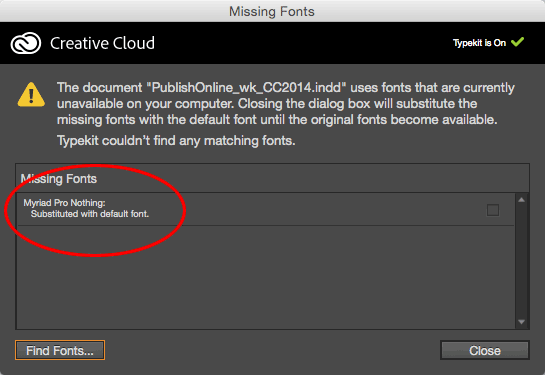
Nothing? Not regular, italic, bold, semibold… just Nothing! There is no such thing as the Nothing style in the Myriad Pro family, of course.
There is actually a lovely font called Nothing, but certainly not a “nothing” style.
Of course, I clicked Find Font, and then clicked the More Info button, which is sometimes helpful when troubleshooting:

Curiously, Find Font says this is not used in any styles, but that’s wrong… I clicked Find First which highlighted some text in the document. Then I noticed it had a character style applied to it: the Hyperlink style that is often created and automatically applied when you make a hyperlink!
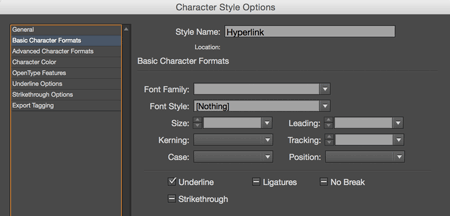
That is very weird. I wish I had a clever answer for how this happened, but I don’t. Anyone have any ideas? In the meantime, I just chalk it up to cosmic rays, and perhaps even minor document corruption. It was easy to find and easy to fix, which is sometimes the best you can ask for.
This article was last modified on July 25, 2019
This article was first published on December 28, 2015
Commenting is easier and faster when you're logged in!

Recommended for you

The Path to Beautiful Tables: Working With Table Rules
In this installment of our series on creating beautiful tables (see Part 1 here)...
How to Apply an Animation Sequence to an Object in InDesign
Learn how to apply a sequence of animations to an object in InDesign—something t...

Don’t forget to show your edge(s)
Many InDesign users have a dislike of frame edges due to their somewhat distract...