




I’ve been sitting here, editing a document that someone sent me, and wondering why every time I do a Find/Change it takes much longer than usual. Find/Change usually goes pretty fast, and I can make a change that replaces hundreds or even thousands of pieces of text in a few seconds. But in this document it is taking fffffffooooorrrrrreeeevvvvvveeeeeerrrrrrr…
And then it hit me: with each change, InDesign must be trying to reflow something in the background. And the feature that most often is culpable of trying to reflow stuff is Smart Text Reflow.
The Smart Text Reflow feature is pretty neat because it can automatically add or remove pages (and threaded text frames) from your document as your story grows or shrinks. That way you don’t have to worry about adding pages and frames, manually threading them, and so on. I wrote about it back here in this post.
You can turn it on and off in the Preferences dialog box:
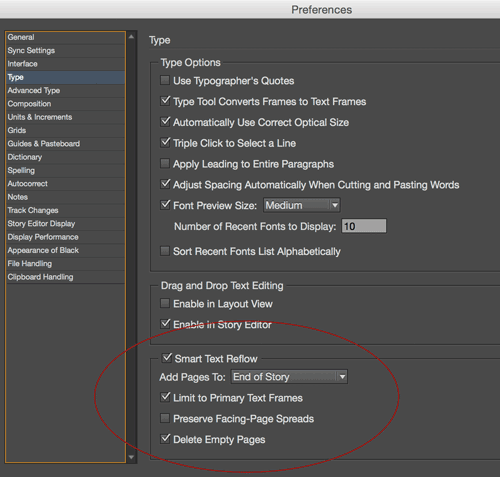
So when I opened Prefs for this particular document I was working on: Yup! It was enabled. And the main story was flowing through 100 pages of primary text frames.
To test my hypothesis, I turned off Smart Text Reflow and tried a find/change query again. It was as fast as ever. Hooray!
So make a mental note: disable Smart Text Reflow when you don’t need it.
This article was last modified on July 25, 2019
This article was first published on April 30, 2015
Commenting is easier and faster when you're logged in!

Recommended for you

Convert Text to Lowercase with a GREP Utility
InDesign's GREP cannot convert text to lowercase... but that doesn't mean you ca...
Remove Multiple Returns and Replace with Space Between Paragraphs
You're given a file that is full of extra paragraph returns. How can you remove...

GREP Query Manager
The script displays an overview of all your GREP queries and their contents. Que...