


Help! Where Did the Cross References Panel Go?
Has the Cross-References panel left the building in CC 9.2?


You may have heard the buzz recently about InDesign’s and improved hyperlinks panel. Rufus Deuchler made a great video about it here. Hyperlinks are now simpler to make and easier to edit. But I want to point out that what’s been a bit glossed over is how the Hyperlinks panel has changed: specifically, what has been removed from the Hyperlinks panel.
Here is the hyperlinks panel as we used it in previous versions of InDesign. In the lower half of the panel lives a related feature: Cross References. I use cross references every day, and without thinking, whenever I need to get my cross references panel I go to: Window > Interactive > Hyperlinks.
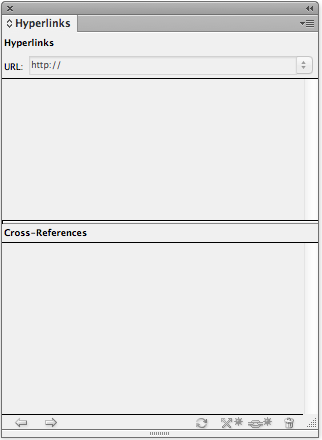
Old Hyperlinks Panel
As a Creative Cloud member, I recently upgraded to version 9.2. The next time I needed to make a cross reference, I went to: Window > Interactive > Hyperlinks.
Imagine my horror when I discovered the Cross References were gone!
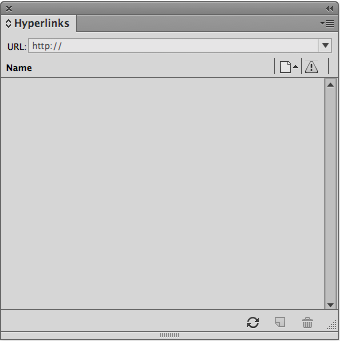
New Hyperlinks Panel
Perhaps I missed something all these years? Did I not have my morning coffee yet? Where oh where did the cross references go? I was so flabbergasted that I put out a call on twitter and a couple of people came to my rescue. It turns out that that Cross References finally grew up, moved out and got a place of its own! Cross References are now located in, you guessed it: the brand new Cross References panel. You can find it in Window > Type and Tables > Cross References.
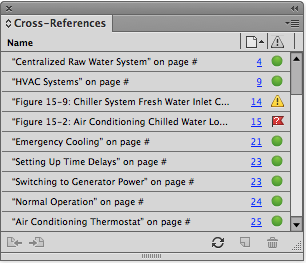
So fear not, Cross References still exist. They just live in a different place now.
This article was last modified on December 30, 2021
This article was first published on January 31, 2014
Commenting is easier and faster when you're logged in!

Recommended for you

InDesign How-to Video: Create a Hyperlink Style
In this week’s InDesignSecrets video, David Blatner explains how to create a def...
Figure Numbering in InDesign (and cross-references to them)
How do you set up automatic figure and table numbers? And how do you point to th...
Assigning Hyperlinks Automatically to SKUs and other Text with a Script
David Blatner shows how to use a free script that can add automate the process o...