



Among InDesign CS5’s new features is one called “document fonts.” Briefly, it works by allowing the recipient of a packaged InDesign file–a client, service bureau, ect.– to open that file and utilize the fonts in the document without having to install them in the system.
This is terrific in theory, but it looks like something’s not quite right when using small caps. A recent post on Adobe’s User to User forums as well as a post here at InDesign Secrets got me curious so I tried it out myself.
Check out the screen shots below:

The top is the original document while the bottom one is packaged InDesign file.
Sure enough, the packaged file does not display the small caps. Even more curious is that the text does appear to have the small caps attribute assigned. Checking the character panel or the control panel with the text highlighted confirms this.
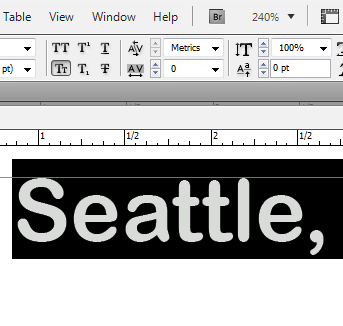
I’ve been able to reproduce this with fonts that don’t have real small caps built in, but with the few I tried that do, I couldn’t reproduce it. I can even change the font attribute to a full featured OpenType font such as Minion Pro and the small caps is honored. Change it back to Arial Rounded and it loses the formatting.
I don’t have any solid advice here except to be very aware of this if you use small caps and send packaged InDesign files to others.
Update 4/26/11: This bug, along with several others has reportedly been fixed with the 7.0.4 update
This article was last modified on December 20, 2021
This article was first published on July 3, 2010
Commenting is easier and faster when you're logged in!

Recommended for you
CS5’s Gridified Tools Adds a Wrinkle to Drawing Starbursts and Polygons
Confused by CS5's new polygon tool behavior? This will clear it up.
InDesign CS5’s new Bounding Box
Don't overlook CS5's incredibly useful Transformation Bounding Box!

Animation Customization via IDML
Oh no! Not another animation post from Mike! Yep, but this is a good one. It sho...