Back

If your email is not recognized and you believe it should be, please contact us.

  • You must be logged in to reply to this topic.Login

Font viewer for uninstalled fonts from disk inside InDesign

Return to Member Forum

  • Author
    Posts
    • #56812
      Anastasius
      Participant

      Hello!

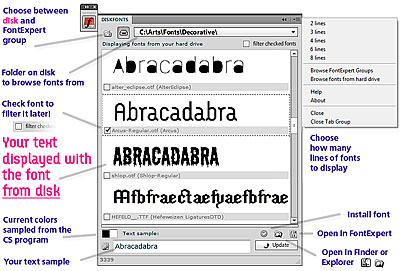
      I developed a new extension panel – DiskFonts font viewer – it's a software font viewer and management plugin for the major Adobe Suite progs (InDesign, Photoshop, Illustrator etc.). It looks like a native panel like Layers and allows to preview fonts from hard disk before installation. You can view and compare fonts from disk how the printed text looks like. And then install font you liked. Supports TrueType, Open Type and many other formats of fonts. And compatible with Mac and Windows…

      Note, it's currently a CS5-only tool, I'm planning to extend it to other versions in the next major updates.

      Would like to receive some feedback, thank you!

      DiskFonts screenshot

    • #56815
      David Blatner
      Keymaster

      Cool! Thanks for sharing. Very interesting idea.

    • #56818

      It's too good — it shows several font types that you cannot use in InDesign: .fon, .fnt are Windows Bitmap formats. Don't know for sure about .mmm, as I haven't seen one of these in over a decade.

      Are the fonts installed 'the regular way' into the host OS, or are they added to Common Files/Adobe/Fonts?

    • #56820
      Anastasius
      Participant

      Thanks :)

      Yeah, it installs fonts the regular OS way (Windows and Mac). Actually, I've never used these types of fonts myself, but it costed me nothing to add them, so I thought – why not?

    • #57807
      Anastasius
      Participant

      Hello!

      I've updated the DiskFonts font manager extension panel for Adobe Creative Suite. The changes are dramatic, I'll just mention some of them:
      DiskFonts now supports InDesign CS5, CS4 and CS3 (both Mac and PC), as long as all major progs of Adobe Creative Suite, like Photoshop, Illustrator, Flash, and more!

      Favorites. You can add fonts to list of Favorite fonts to recall them later
      Bookmarks. You can bookmark frequently used paths with fonts
      Pins. You can pin fonts to the top of the list – for a more faster comparison with the rest of the list
      Drag'n'drop. You can drag and drop styled text directly from the panel into your document
      iPod/iPhone/Android. The panel can be viewed on the mobile devices with touch ability.
      Subfolders. You can compare fonts from all subfolders in a single list.
      Install fonts, uninstall fonts
      FontExpert groups support improved
      Speed improvements (2-10x times faster), GPU support for faster font rendering, search for the fonts, checkmarks operations with fonts, bug fixes, change colors of the fonts inside the panel, small UI fixes and improvements, settings are saved in a text file, quality improvements to fonts rendering
      even more!

      – Here's the video, explaining most (but not all) features.
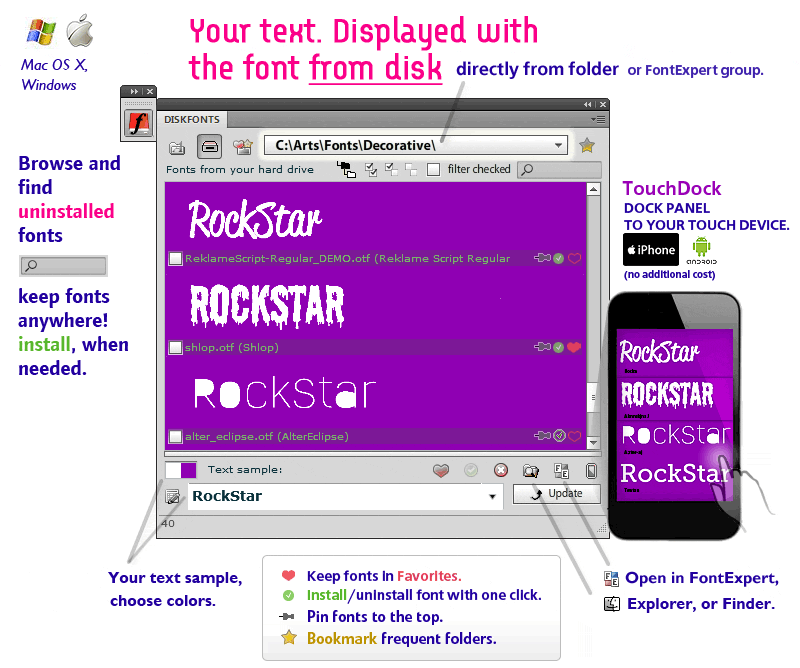
      DiskFonts font manager screenshot

Viewing 4 reply threads
  • You must be logged in to reply to this topic.
Forum Ads