



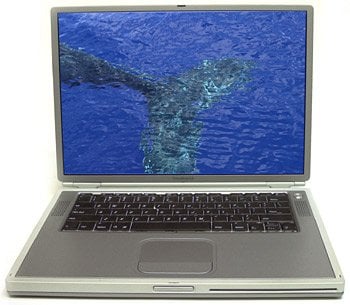
As the plane reached cruising altitude, I opened the lid of the new titanium PowerBook G4 and started it up. The machine was on loan from Apple Computer; I had picked it up that same day at Apple’s offices in Cupertino. I was on my way to San Francisco for a presentation, then on to Hawaii for another presentation. During a break in the hotel meeting room in San Francisco, I connected a crossover cable (an Ethernet cable with two of the wires switched for a computer-to-computer private network) to my older PowerBook (a G3 Wall Street model) and transferred my presentation to the new machine.
I wanted to make my presentation with the titanium model. You have to understand that for consultants like me, this new PowerBook tantalizes in so many ways. Not only does it have features I wanted to try out — a large LCD display, a wireless Airport network card, a 500MHz processor, and so on — but it also has the kind of cachet that makes a statement. When you’re paying someone to hear a presentation, you want the presenter to appear on the cutting edge. I was only too happy to comply. What follows here are my first, on-the-fly (literally) impressions of working with Apple’s state-of-the-art laptop.

The LCD of the titanium PowerBook G4 measures 15.2-inches diagonally.
Not ‘N Sync
When it was my turn to connect my machine to the projector, I plugged the VGA cable from the projector into the outgoing VGA plug on the back of the PowerBook. It didn’t work. I figured it must be a sync problem. The new G4 has a screen resolution of 1,152 by 768, which was greater than the projector’s maximum of 1024 by 768.
I refuse to fumble with computers in front of an audience, so I immediately disconnected it and switched to my PowerBook G3. That machine worked fine, and I gave my presentation. An hour later I dashed off to the San Francisco airport for the flight to Hawaii. My schedule was frenetic, typical for me these days as I try to fit as many things into every day as possible. I would have several more opportunities to use the new computer with a projector in the coming days, and more time to get it to work: I was carrying my own projector with me, and would be using it at least twice on this trip.

The PowerBook G4 weighs a mere 5.3 pounds including its battery and measures only 1 inch thick.
Later, when I had more time, I dived into the Monitors control panel and got the computer to talk to the projector (getting the two to work together is different than with the PowerBook G3).
Airport: The Movie
The “Titanium,” as I began to call it, came with 256MB of RAM, and the model in my possession has a 500MHz processor (it’s also available with a 400MHz chip) — the same as my desktop machine back in the office. With 20GB of hard disk space, this portable can be used to capture video, build movies, or store thousands of digital photos. The back panel has a FireWire plug, a 10/100 BaseT Ethernet connector, two USB jacks, a VGA monitor-out jack, an S-Video out port, and a modem jack.
Added to this unit was an AirPort card (mine came installed, but it’s actually a separate purchase), which puts a small radio antenna under the keyboard so it can share data with an AirPort base unit for wireless local Ethernet. Users on other sites have reported problems with the AirPort card, but I didn’t really try it out so can’t comment.
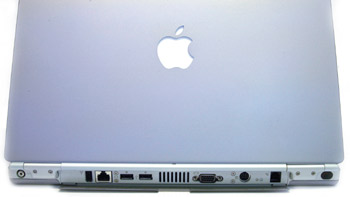
The back panel provides one FireWire connector, two USB ports, one 10/100 BaseT Ethernet connector, and one S-Video output, among other connectors.
For someone who spends a lot of time on planes, the prospect of watching DVDs on the large-screen Titanium beckons. I tried a DVD in the elegant slide-in CD/DVD reader slot. The disc slid smoothly into the machine and started playing automatically. With headphones, the sound is excellent. The built-in speakers are pretty tinny (my son, Patrick, suggested they are “titanium-y”), in contrast to the Bose speakers in my older PowerBooks. Considering the space in which the speakers must fit, I am not at all surprised by their fidelity. That’s no big deal.
This article was last modified on December 13, 2022
This article was first published on March 15, 2001
Commenting is easier and faster when you're logged in!

Recommended for you

Tip of the Week: Drag and Drop Anchored Objects
This tip was sent to Tip of the Week email subscribers on December 17, 2015. Sig...

A Script to Align Dashed Strokes to Corners in Photoshop
This free script solves the problem of sloppy-looking corners when you use dashe...

Help, My InDesign Palette Is Empty!
Did one of your panels (or part of a palette) suddenly go completely blank? Ther...