



Back in the olden days when dinosaurs ruled the earth and most of us had 12″ monitors it was important for software engineers to find ways of saving on screen real estate. In some cases they did this by putting tools in stacks. With a click and hold the tools would flyout and you could choose the right tool. For those of you unaware of how this works, just look at any Adobe application tool box. I’ll pick a random application, InDesign, for this demonstration. Check out the screenshot below:
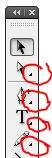
Notice the small indicators telling me that there’s more here than meets the eye. If you click and hold any of these tools you’ll get a flyout allowing you to pick the alternate tools. (bonus tip, alt/opt+click any of these tools to toggle through the choices)
For example, the direct select tool and the postion tool occupy the same space on in the toolbox, but like Superman and Clark Kent they can never be seen in the same place at the same time.

I realize that saving screen real estate is still important but there’s plenty of room on today’s monitors for all of the tools to get equal treatment.
This article was last modified on December 19, 2021
This article was first published on January 26, 2009
Commenting is easier and faster when you're logged in!

Recommended for you


This Week in InDesign Articles, Number 15
Some cool new technologies, some good videos, and some fun tips!
Customizing PDF Presets
My other two postings about PDF presets?Choosing the Right PDF Preset and Creati...