



Frequently I get asked a variety of questions. Since my last post was pretty off the wall on the geek factor, I thought it might be a good idea to rear it in a bit with some recent Q & A’s.
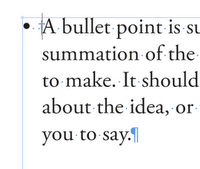
Q: How do I line up all of my bullets or numbers?
A: There are two answers to this. The long answer is to use the bullet or numbered list function, but that is for another post. The quick answer is to use the indent to here character.
If you want your text to hang flush, place your cursor where you want everything to hang and type “CMD \” or “CTRL \”. This will type the indent to here character and the rest of your paragraph will indent to the space specified.

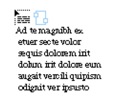
Q: My cursor has this strange icon(loaded cursor), and when I click it makes a box. I don’t want it to do that.
A: You may have gotten this by accidently clicking on the outport of a text frame. If you are in CS3 or CS4 you can just hit the ESC key and say goodbye to that cursor.
Q: How do I round just one corner?
A: Go to window > Automation (scary, I know) > scripts. In the scripts panel, follow the trail of folders: Automation > Samples > JavaScript > CornerEffects.jsx. Now select your frame, and then double click on the cornereffcts script and follow the prompts.

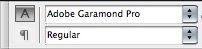
Q: How do I change the default font?
A: I am sick of Times New Roman too. Here are the steps.
- Close all documents you have open.
- Click on the type tool.
- Change the font to a new default font. (comic sans anyone?)
For every new text frame you make in new projects, this will be your new default font.
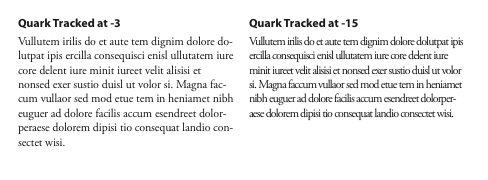
Q: Tracking doesn’t work!

A: That really isn’t a question, but I assume that you are a Quark User.
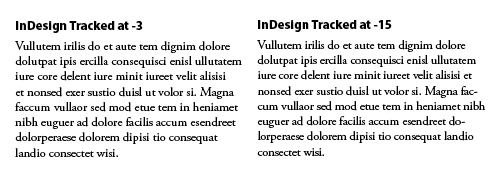
In QuarkXPress people are used to tightening up the space by changing the amount to -1, -2, or -3 and most people are comfortable with these amounts. If you have been using Quark for awhile and then jump into InDesign, Illustrator or Photoshop and try to use tracking, you may run into some issues. Quark and Adobe measure tracking differently.
In QuarkXPress tracking is measured in units 1/200th of an em. In Adobe applications this is measured in units 1/000th of an em. This means that you are using to measuring -1, -2, or -3, you will need to multiply that number by 3 to get the same results in any Adobe application. Therefore you new numbers to type in for tracking are -5, -10, and -15.
This article was last modified on July 11, 2023
This article was first published on December 3, 2008
Commenting is easier and faster when you're logged in!

Recommended for you

See Previews of InDesign Files Outside of Bridge
I'm a huge fan of Adobe Bridge, the free "digital asset management" program that...
Copying/Pasting Text from PDFs to InDesign
The other day I needed to copy a paragraph of text from a client-supplied PDF in...