




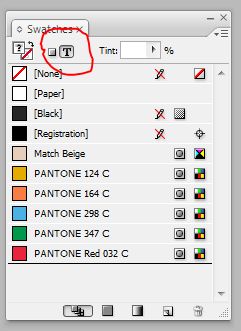
A recent post on the user to user forum was complaining about the difficulty of trying to apply swatches to text in InDesign. The poster went on to say that it seemed like a waste of time to deselect the text frame and then select text. Well, that’s correct. What the poster, and apparently a lot of other folks didn’t know, is that it’s simple matter to switch the focus of the swatch panel from the frame to the text itself.
With the frame selected, just hit the “J” key. The Swatches Panel focus will immediately switch to the text and you can apply the swatch you’d like to your text.
This article was last modified on December 19, 2021
This article was first published on September 8, 2008
Commenting is easier and faster when you're logged in!

Recommended for you

Make Headings Span Across Multiple Columns in InDesign
Master InDesign’s Span Columns feature with Pariah Burke.

Index Fixes: No Styling in Topic Names
Topic names cannot natively be styled in the Index panel. However, a simple solu...