



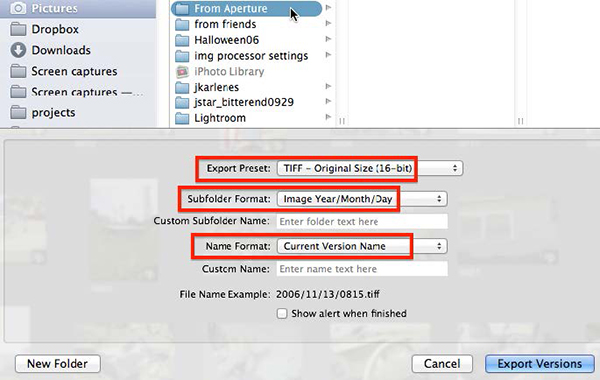
Adobe is featuring a timely Aperture to Lightroom guide on its website. The six-page PDF provides step-by-step instruction on how to migrate from Apple’s dearly departed photo editing software to Adobe’s Lightroom. The two programs use different processing engines, so adjustments made in Aperture won’t make the transition. Adobe recommends saving Aperture’s images as TIFF files in addition to the original to provide side-by-side comparison when opening those images in Lightroom.
The guide gives a decent breakdown of items that won’t survive the transition—including flags, color labels, and custom metadata fields. The biggest help the guide provides is a set of workarounds for those items left behind. Adobe recommends sorting items into Smart Albums based on attributes, then manually adding keywords to match.

There is mention of a forthcoming migration assistant tool, but no indication on its availability. While you can continue to use Aperture, it probably makes sense to make the switch to Lightroom sooner rather than later and avoid having to perform these steps under the stress of a deadline.
This article was last modified on January 28, 2021
This article was first published on August 7, 2014
Commenting is easier and faster when you're logged in!

Recommended for you

Editing InDesign Files Directly off a Server: Crazy?
David says no one in their right mind would edit an InDesign file directly off a...

What’s New in Creative Cloud 2024
Learn how Adobe is using generative AI to transform Creative Cloud
Achtung! Our InDesign Special Characters Guide in German
Danke (thank you) to Rudi Warttmann for translating our popular field guide for...