




Ginny wrote:
I’ve imported 40 pages of directory listings each with a hard return at the end of a line. Is there a way to globally change the hard returns to soft returns, or forced line breaks, once the text is imported from a word doc into InDesign?
The goal is to separate each member’s info with a space after attribute using the hard return, with the rest of each members info spaced with leading only.
This requires a tried-and-true technique: A triple Find/Change.
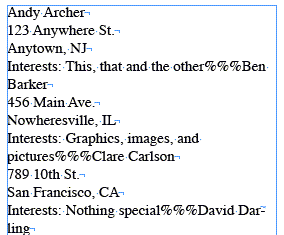
Lets take some sample text, as you described:
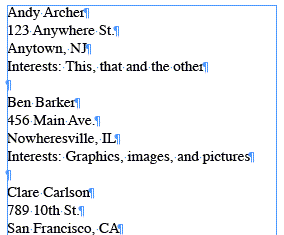
It’s easy to replace a return with a soft return in Find/Change, (Find: ^p, Change: ^n) but that’s usually going overboard. You end up with one monstrously long paragraph with no easy way to break them up into smaller ones.
So you start out by figuring out what unique thing — a text string, a character style, a certain number of returns — only appears immediately before or at the beginning of your “real” paragraphs and on no others. Then you use Find/Change to temporarily replace that unique identifier with something that doesn’t contain any return characters. I often use %%%.
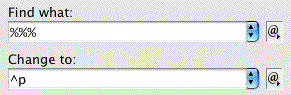
For the sample above, the “real” paragraphs are identified by two returns in a row (pretty common). So we replace that identifier with a unique string.
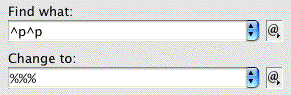
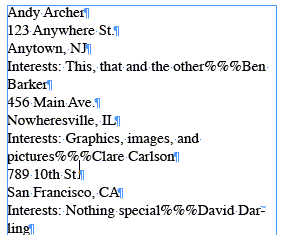
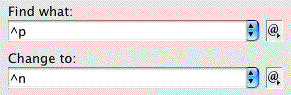
The third and final Find/Change replaces the unique paragraph separator we added with an actual return character.
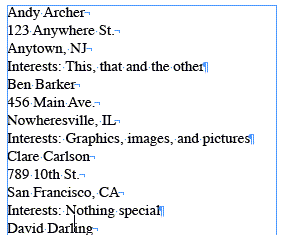
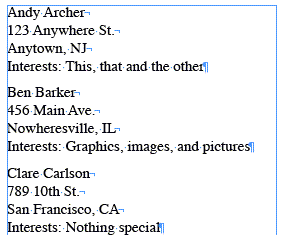
So now you can easily select all the text and apply paragraph formatting, such as Space Before, that does what you want it to.
This article was last modified on December 18, 2021
This article was first published on March 5, 2008
Commenting is easier and faster when you're logged in!

Recommended for you
How to Make Motion Look Realistic in Premiere
Create a convincing animation in Premiere using the Transform effect.
Free InDesign and InCopy CS3 Trials Available
Adobe just made free trials available for all their web and design Creative Suit...

Avoid Costly Printing Problems With Real World Tips
Excerpted from “Real World Print Production.” Copyright © 2007. Used...