




The first step to making the PowerPoint UI a better place to work is to adjust settings and turn off features you don’t want to use. Here’s how.
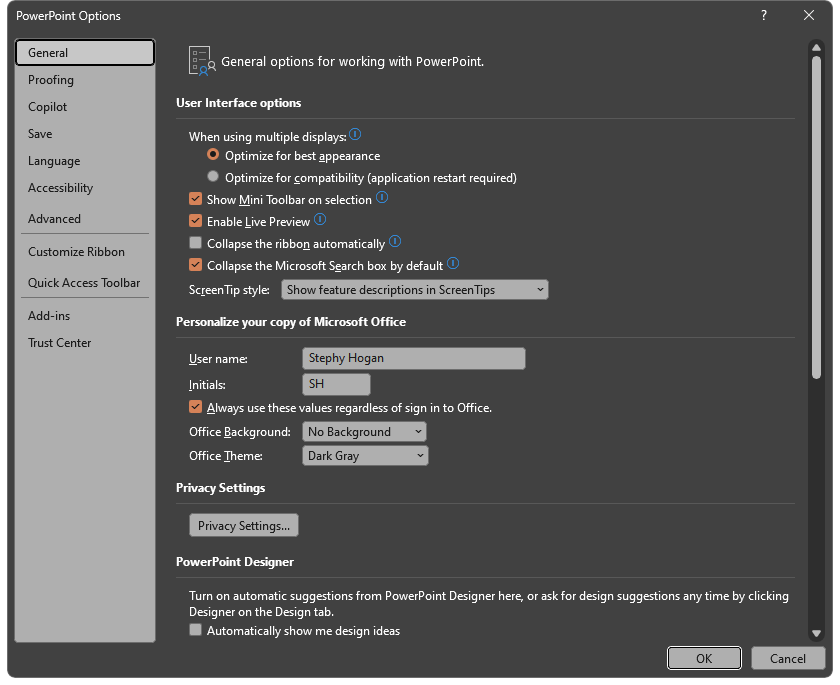
On PC, go to File > Options (all the way on the bottom left).
On a Mac, go to PowerPoint > Preferences.
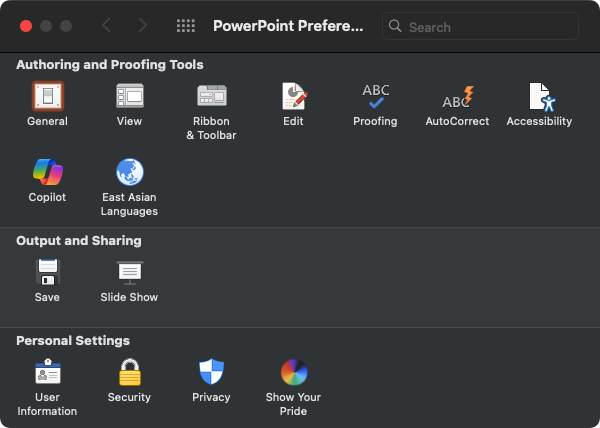
For example, I always:
- Collapse the Microsoft Search box by default (General on PC, no option available on Mac)
- Change my office theme to Dark Gray on PC and Aluminum on Mac (General for both)
- Turn off PowerPoint Designer and LinkedIn Features (General for both)
- Disable Copilot (I have strong feelings about this upgraded version of Clippy)
- Disable Automatic Alt Text (Accessibility for both)
- Uncheck Discard editing data and Do not compress images in file (Advanced on PC, no option available on Mac)
- Set default resolution to High fidelity (Advanced on PC, no option available on Mac)
- Check the box next to High quality in the Print settings (Advanced on PC, no option available on Mac)
This article was last modified on October 30, 2025
This article was first published on June 27, 2025
Commenting is easier and faster when you're logged in!

Recommended for you

How to Give That “Ugly Sweater” Slide a Makeover
Transform ugly PowerPoint slides into merry masterpieces with Jody Wissing!
How to Make Accessible Tables
Make tabular data accessible using InDesign, Word, PowerPoint, or Excel

10 Photoshop Efficiency Tips from CreativePro Week
Use these quick tips to increase your efficiency and enjoyment in Photoshop.