Back

If your email is not recognized and you believe it should be, please contact us.

  • You must be logged in to reply to this topic.Login

Story Editor: Undeletable, Invisible Text with Strike Through

Return to Member Forum

  • Author
    Posts
    • #14394194
      James
      Member

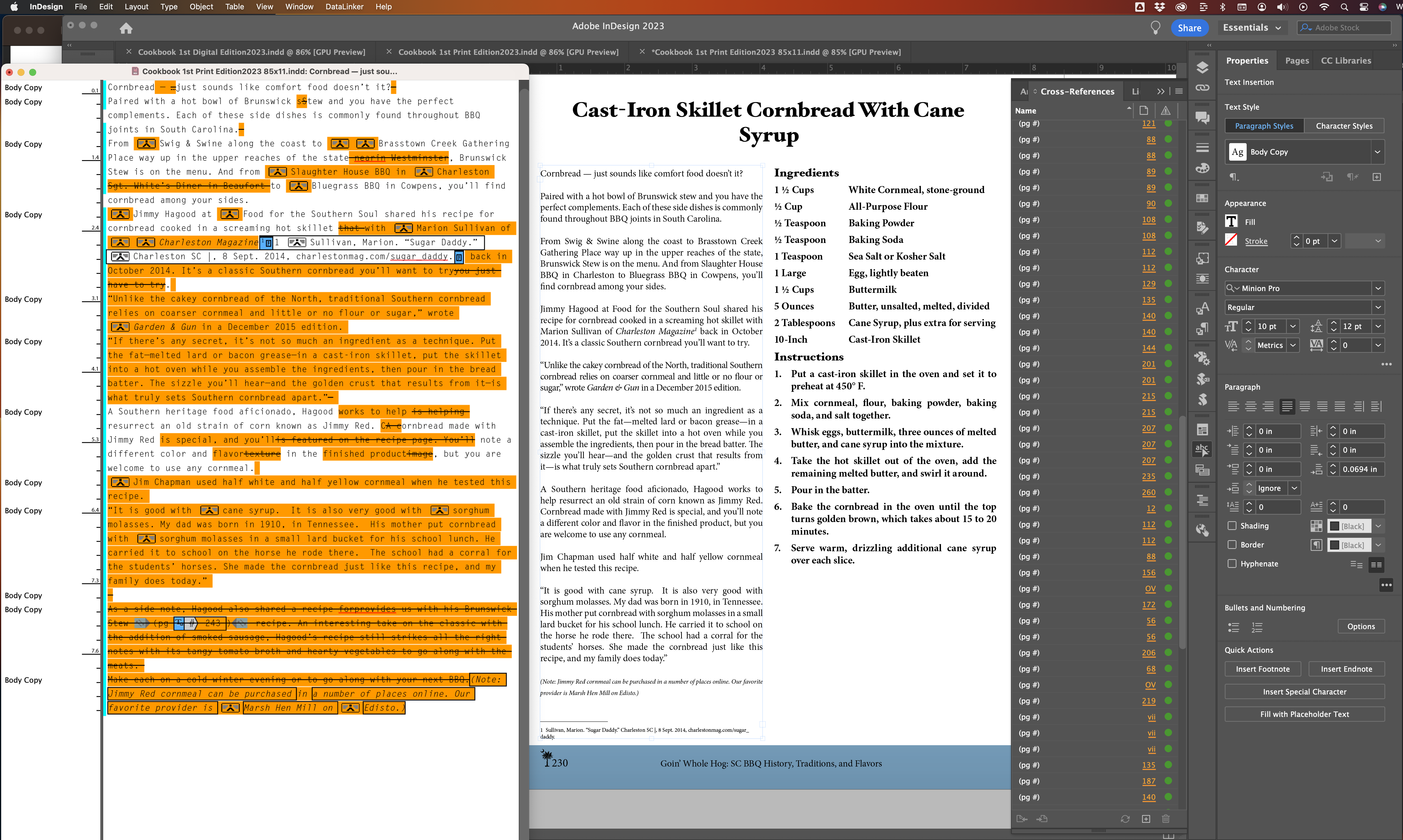
      As I was checking cross-references, I came to one listed as OV. Clicked on it, taken to the page, couldn’t see what was in question. So…opened the text frame in Story Editor. In it, I find all the visible content of the story on the page, AND below it, there was additional text that was not visible on the page, despite adjusting the size of the frame. Oddly all of that text had a strike-through applied and while I could select it, I could not delete it or do anything else with it, really. What’s going on and how do I get rid of it…and is this why when I am asked if I want to include the info in overset text when try to generate the index, despite preflight showing no overset text?

      Here’s a screenshot example.

    • #14394198
      Connie Taylor
      Participant

      Try copying what you want to keep from the text frame, pasting it aside for the moment and then deleting the fame with the unwanted materials. Then replace with the pasted good material.

    • #14394201
      James
      Member

      Answered my own question!! Apparently, it’s related to “Track Changes.” So…what to do now to safely get rid of all that? Accept all changes?

      Thanks, Connie. I actually tried that previously, and it worked. Unfortunately, given the vast number of text frames in this 287 page document, that doesn’t seem like a lot of fun.

      After a couple of tests, I’m feeling pretty confident that “Accept all changes…In this Document” will be the way to go. David?

    • #14394203
      Connie Taylor
      Participant

      I’d make a complete backup of your files and set it aside safely before trying accept all changes. I find track changes unpredictable and so avoid it. I’d make two backups just to be sure one was safe.

    • #14394204

      Yes, accept all changes is the answer. The struck-through text is text that someone deleted, perhaps not realizing Track Changes was enabled. The highlighted text that is not struck-through is text they added.

      What you see in the Layout is a view of the story as though all changes had been accepted.

    • #14394205
      David Blatner
      Keymaster

      Here’s more on Track Changes:

      Tip of the Week: Tracking Changes

Viewing 5 reply threads
  • The forum ‘General InDesign Topics (CLOSED)’ is closed to new topics and replies.

Forum Ads