


Script of the Month: What the GREP?
This month’s script can help you understand and troubleshoot GREP expressions.


This article appears in Issue 148 of InDesign Magazine.
As we’ve often said, using GREP can take you to newfound heights of productivity in InDesign. But the problem is, learning GREP can leave you in the depths of despair. Sure, short and simple expressions are pretty easy to assemble and decipher. But once you start combining those basic bits into complex queries, it’s very easy to get lost. And trying to reverse engineer a lengthy expression to figure out why it’s not working can confound even experienced GREP users. That’s why Theunis de Jong, aka Jongware, wrote What The Grep?, a script that will tell you in plain English what every piece of an expression means. It’s an invaluable aid in learning and using GREP.
Download the script here. When you run it, the script copies whatever is in the Find What field in the GREP area of the Find/Change dialog box. Or you can type in whatever expression you want it to interpret.

The script can lift expressions from a Find/Change query.
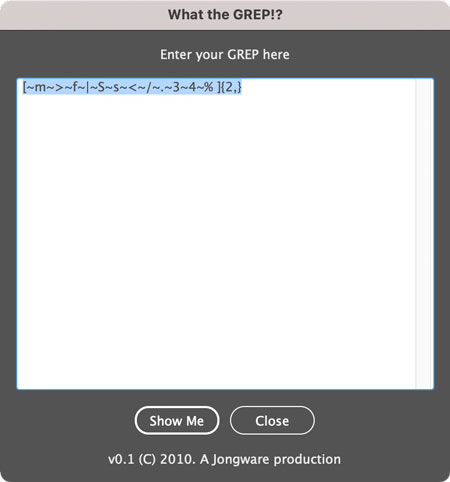
Or you can type them directly in the script’s dialog box.
Click the Show Me button, and the script creates a new document where every part of the expression is translated. A second version of the expression is also rendered with color-coded swatches. Any syntax errors are shown in bold and red, making them a lot easier to fix.
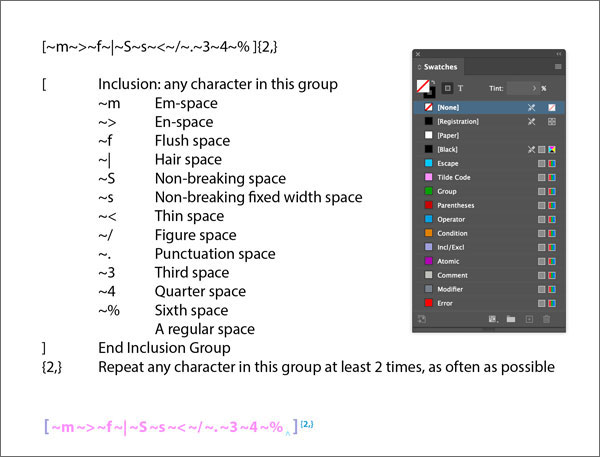
The script creates a document to translate the expression into plain English, along with a color-coded version of it.
Commenting is easier and faster when you're logged in!

Recommended for you

Scripts from the Crypts
Mike Rankin digs deep into the InDesignSecrets archives to find 20 scripts that...

InReview: MyDataMerge
Well-thought-out app picks up where InDesign’s DataMerge features leave off.
Tip of the Week: Using Power Zoom
There are three new Links panel icons in InDesign CC that you'll see when workin...