Back

If your email is not recognized and you believe it should be, please contact us.

  • You must be logged in to reply to this topic.Login

Size and Position options in Object Styles

Return to Member Forum

  • Author
    Posts
    • #14339509
      Pat Bensky
      Participant

      Hi,
      I would like to create an Object Style for a text box which would place the box in a particular position on the page – say, the top right-hand corner. I have been trying to use the Size and Position Options in the Object Styles dialog, but the only part of it that seems to have any effect is the x and y offsets. Clicking on one of the little boxes in the position grid has illogical effects. Can enybody explain how that is supposed to work?
      Thanks!

    • #14339511
      David Blatner
      Keymaster

      I agree that this can be confusing at first. The little “reference point” boxes mean “the part of the object you’re controlling.” However, you can only base the page measurement on the upper-left corner of the page. So, for example, if you want to put the upper-right corner at 1/2 inch from the right side of an 8.5″ page, you’d set it to 8″.

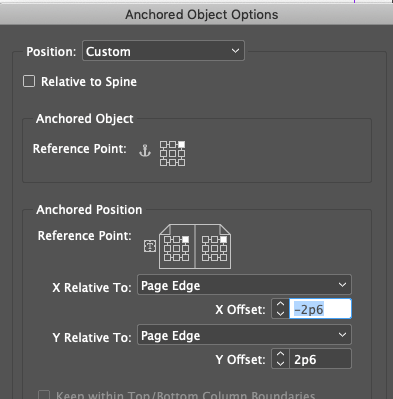
      As it turns out, there are much better controls when it comes to anchored objects. For example, here’s how you’d do it if you were anchoring the upper-right corner of a frame to the upper right corner of the page:

      But of course, this requires you to anchor it in a text frame… not just loose on the page.

Viewing 1 reply thread
  • The forum ‘General InDesign Topics (CLOSED)’ is closed to new topics and replies.

Forum Ads