



Daniel wrote:
I’ve linked boxes of text throughout a whole document. Is there a quick/simple way to unlink these boxes without losing the formatting/flowing of the text?
Yes! Next question?
Oh, sorry, you want more details? We talked about this a bit back in Podcast Episode 49, but if you skipped that one, here’s the deal:
There is a really slow way, and two fast and easy ways. Obviously, for the sake of character-building, we have to look at the slow way first.
When you duplicate a text frame in a thread (such as by Option/Alt dragging it, or using cut and paste), the duplicate contains all the text that was in it, plus all the text to the end of the story… but not the text that was in previous frames. So you could duplicate the frame, place the cursor at the end of the frame, press Command/Ctrl-Shift-End to select from that point to the end of the story (which is currently overset), press Delete, then go back to the original thread and remove that same chunk from the thread. Then repeat.
Okay, now lets look at two ways that sane people would use. First, there’s a script called SplitStory. It’s free. It ships with CS2 and CS3. In CS3, it’s actually installed for you automatically — just look in the Scripts panel, inside the Samples folder. In CS2, you may have to find it on your install discs or on the Adobe Web site. I use the javascript version. Here’s the original thread:

Here’s the script:
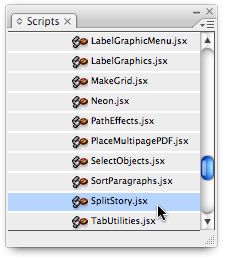
Here’s what happens when you double-click on that script:
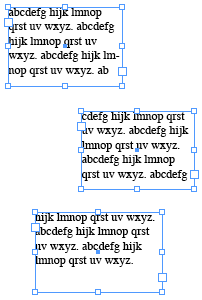
Yay! Pretty cool, eh? For most people that does exactly what they need. Job finished.
Unfortunately, there is (at least) one side effect that you need to watch out for. If the thread splits paragraphs in the middle (as in the thread above), and the paragraph has a first line indent, then that first line indent gets applied to all the pieces of the paragraph. For example, I reverted back to the original thread, gave the paragraph a first line indent, and ran the script again:
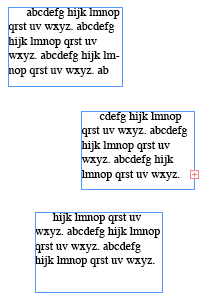
So that’s a pain. But in most cases where paragraphs aren’t actually split across frames, the script works beautifully. Plus, it’s free, and you probably already have it, so that’s good.
That said, there is an even more powerful option: The Clever TextLink plug-in from aextra software. It does way more than the script does, including giving you options for splitting stories right in the middle of a frame. It’s Clever (thus its name)!
That would be the end of the story, but I have to add one more mailbag email that came in on the same subject… just because of the opening line:
Tom wrote: So I stumped the guys on the Adobe help line about this for hours. I inherited a document that had threaded pages. Our books are image heavy and threading drives me batty when I need to move pages around. So how do you unthread pages? Is it possible? The guys at Adobe said no.
I definitely don’t want to give the tech support staff at Adobe a bad time — they have an incredibly hard job. But if any of them are reading this: Make sure you know about all those free scripts!
They’re lifesavers!
This article was last modified on December 18, 2021
This article was first published on February 20, 2008
Commenting is easier and faster when you're logged in!

Recommended for you

Changing Kerning/Tracking Increments
James wrote: Is there any way to track incrementally? That is, I'd like to be ab...
What’s The Break Keyboard Character?
Terre Dunivant wrote: What is that icon/shortcut next to Type > Insert Break...
The InDesignSecrets Chutzpah Award for Creative Uses of InDesign
Daniel T. wrote us to report a creative use for InDesign: My current contract ha...