



Toby writes:
I’m making a form where each section has a paragraph with fill-in-the-blanks and I need to make parenthesis under each fill in the blank, such as (noun), (adjective), (verb), etc.
It sounds like you’re either making a formal legal contract or one of those fun Mad Lib forms! Your question caught me at just the right time, because I was dangerously close to actually getting some work done, and trying to figure this out was the perfect distraction to help me procrastinate!
Plus, Ashley just wrote this great piece outlining various ways to make lines in forms.
There are several ways to create this kind of effect:
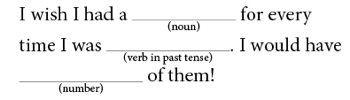
The tricky part of this is being able to quickly edit the text beneath the line and always keep it centered. The good news is that, although it takes a little time to set up once, you can apply it very quickly from then on. My favorite method involves creating a text frame that you anchor into the story:

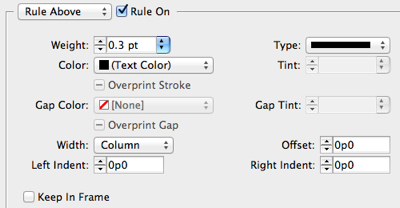
The text inside the frame is set to a paragraph style with a centered horizontal alignment, so that it always remains centered in the frame. It is also given a Rule Above that extends the entire Column Width:
Finally, I made the text smaller and set the baseline shift to a negative number. I’m sure you could do this without the baseline shift, but it was the first thing I thought of.
Once you anchor the frame into the story, you can use Object > Anchored Object > Options to set the Inline Offset to the same size as the height of the frame itself? but negative. In other words, if your text frame is 8 points high, then set the offset to -8 points.

Once you set up your paragraph and anchored object formatting, be sure to save them as a paragraph style and object style so you can apply them quickly later!
If you’d like to play around with this yourself, feel free to download this snippet file and Place it into your InDesign document. (If your browser adds “.txt” to the end of the name upon download, just remove that… it should end with .inds.) The snippet will add a paragraph and object style for you.
This article was last modified on December 21, 2021
This article was first published on August 6, 2012
Commenting is easier and faster when you're logged in!

Recommended for you

WindJack Solutions, Inc Has Released AcroDialogs, a Graphical Designer for Creating Acrobat JavaScript Dialogs
WindJack Solutions, Inc has released AcroDialogs, a graphical designer for creat...

HP Indigo Completes PANTONE Goe Licensing
HP today announced the completion of the PANTONE Goe licensing for the HP Indigo...

PDF Button Tips, Tricks and Problem Solving
Some issues in creating buttons for PDF are easy to overlook, so here are some t...