


InDesign Template: Reflowable EPUB
This is a template for making reflowable EPUBs, developed by Anne-Marie Concepcion, co-founder of InDesignSecrets.com and author of numerous InDesign-to-EPUB video tutorials on linkedIn Learning. Anne-Marie created this in response to numerous requests...

This template is for making reflowable EPUBs, developed by our own Anne-Marie Concepcion, co-founder of InDesignSecrets.com and author of numerous InDesign-to-EPUB video tutorials on LinkedIn Learning. Anne-Marie created this in response to numerous requests from readers for a basic EPUB-ready InDesign template in which to flow and format Word manuscripts.
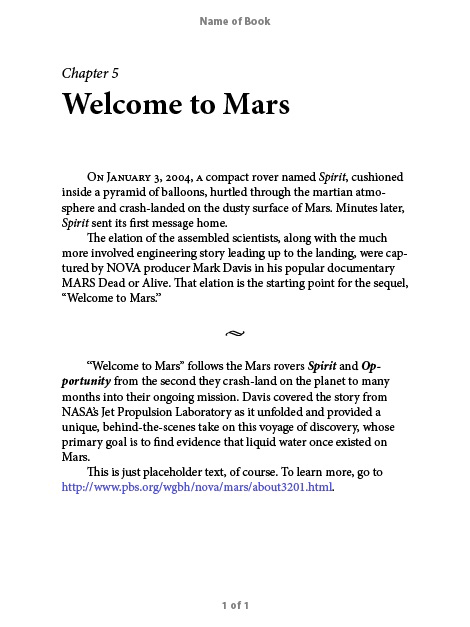
Layout
The page dimensions, margins, header and footer are designed to mimic what a reflowable EPUB will look like on an iPad in Portrait orientation. It has a header that you can change to the name of your book. Headers and footers are included for preview purposes only—they don’t get exported.
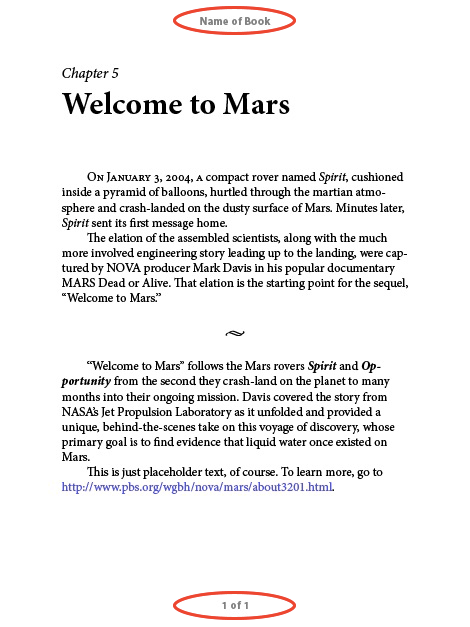
Text Styles
Basic paragraph and character styles are set up for you to apply (or map your own styles to).

Export Tagging is set up so the Chapter Title style is mapped to H1 when exporting to EPUB, and the Chapter number style is set to split the document. If you don’t want to use Chapter numbers, be sure to set the Chapter Title style to split the EPUB (in Export Tagging).
class=”wp-block-heading”>Object Styles
Object styles are included for anchored images and text frames.
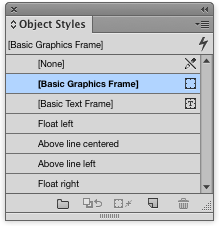
Text wrap is included in Float Left and Float Right object styles so lines will wrap correctly in the EPUB.
TOC
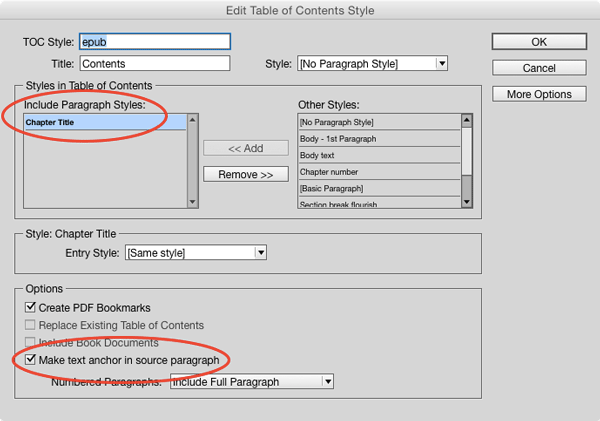
The template also includes a simple TOC Style that includes the Chapter Title and adds anchors.
Commenting is easier and faster when you're logged in!

Recommended for you

Real World Tips for QuarkXPress 5: Web Graphics
Excerpted from “Real World QuarkXPress 5” (Peachpit Press). Peachpit...

InDesigners: Roberto de Vicq de Cumptich and Matteo Bologna
Together, Roberto de Vicq de Cumptich and Matteo Bologna create designs that con...

Sneak Peek at New InDesign Magazine logo
Mike Rankin revealed the new logo he's working on for InDesign Magazine in honor...