


Photoshop How-To: Seeing the Big Pixel


Those of us who cut our teeth on early painting and image-editing programs may shudder at the revival of pixelated images. We spent years trying to reduce the appearance of pixels in our images in order to get them to look as natural or realistic as possible.
Then along comes a trend that embraces the pixel. By adding chunky pixels to images, the artist makes a self-conscious reference to the essence of computer-generated graphics. The images are built with pixels, they seem to be saying, so lets pull off the slick veneer and show what lies beneath.
OK, if that all sounds to Art School 101, the bottom line is that pixels are fun when used a special effect on an otherwise pristine image.
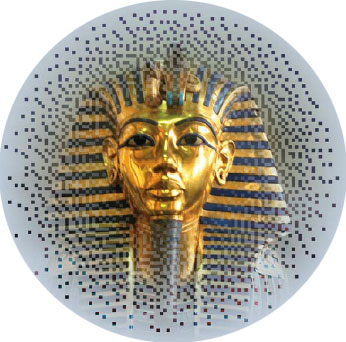
In this excerpt from “Design Graphics Photoshop Studio Skills,” you’ll see how to create a mask from pixels and apply it to an image. Cool!
We’ve posted this excerpt as a PDF file. All you do is click the link “Seeing the Big Pixel” to open the PDF file in your Web browser. You can also download the PDF to your machine for later viewing.
To open the PDF, you’ll need a full version of Adobe Acrobat (5 or higher) or the Adobe Reader, which you can download here.
To learn how to configure your browser for viewing PDF files, see the Adobe Reader tech support page.
Excerpted from “The Adobe InDesign CS Bible” by Galen Gruman. Copyright © 2004 Wiley Publishing. All rights reserved. Reproduced here by permission of the publisher.
This article was last modified on January 3, 2023
This article was first published on October 22, 2004
Commenting is easier and faster when you're logged in!

Recommended for you

Scanning Around With Gene: Part 2 of That '70s Type!
Part 1 of That ’70s Type! Setting type is like re-decorating your home: yo...

The Power of the Gradient Tools in Lightroom
Learn how to use gradients in Lightroom to add drama to a flat sky or brighten s...

Alien Skin Software Brings the Look of Film to iPhone with Alt Photo
Press Release Raleigh, North Carolina –Alien Skin Software has announced the imm...