


QuarkXPress How-To: Experimenting with Initial Caps and Text Runarounds


Initial caps and text runarounds are the bells and whistles of setting text in a page layout program. But while they seem like pure adornment, drop caps provide important points of entry into text-heavy pages and text that runs around graphics breaks up densely packed columns.
QuarkXPress 6 gives you all the tools you need to create text effects like text runarounds, masked type, and initial caps. But the results can look predictable. You can take these text effects to the next level by learning a few tricks and employing additional techniques such as clipping paths and Restrict to Box options.
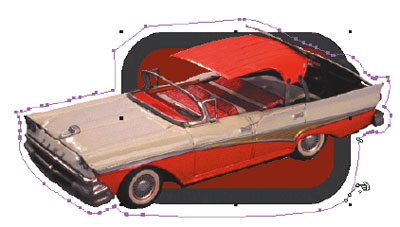
In this excerpt from “QuarkXPress 6 for Print and Web Design,” Germany’s top designer Michael Baumgardt shares a few of his favorite tricks for adding punch to ordinary initial caps, type outlines, and text runarounds.
We’ve posted this excerpt as a PDF file. All you do is click this link “Design Techniques: Initial Caps” to open the PDF file in your Web browser. You can also download the PDF to your machine for later viewing.
To open the PDF, you’ll need a full version of Adobe Acrobat (5 or higher) or the Adobe Reader, which you can download here:
 .
.
To learn how to configure your browser for viewing PDF files, see the Adobe Reader tech support page.
Excerpted from “QuarkXPress 6 for Print and Web Design” © 2004 Michael Baumgardt. Reproduced by permission of Pearson Education, Inc. Publishing as Peachpit Press. ALL RIGHTS RESERVED.
This article was last modified on January 3, 2023
This article was first published on May 19, 2004
Commenting is easier and faster when you're logged in!

Recommended for you

Heavy Metal Madness: A Focus on Hocus Pocus
My favorite type of graphic discovery is one that comes out of nowhere, supplyin...
The Secrets to Smoother Paths in Illustrator
Don’t let poorly placed points ruin your designs.
CreativePro Tip of the Week: Identifying Fonts in Photoshop
This CreativePro Tip of the Week on identifying fonts in Photoshop was sent to C...